Official-source checked
The short answer
Open the official CATCHTABLE Global service, confirm the exact restaurant branch and choose the action actually offered: Reserve, Join Remote Waitlist, or an on-site waitlist. KTO’s June 2026 guidance says the Global flow supports Google, Apple, or email signup without a Korean phone number and accepts foreign-issued cards for reservation deposits.
Before confirming, read the restaurant-specific deposit, cancellation, change, late-arrival, guest, menu, child, dietary, and accessibility rules. Keep the live reservation and email accessible. If the venue is absent or full, try another date or branch, use its documented contact or concierge route, join a supported waitlist, or choose a nearby fallback.
- Korean phone number
- Not required
- Foreign-issued card
- Partially supported
- Korean ID
- Not required
- English support
- Partial English
In this guide
Choose the correct booking route
The important distinction is not “app versus website.” It is Global visitor flow versus a domestic-only or restaurant-specific flow.
Swipe or scroll to see all columns.
| Situation | Best first route | Boundary to check |
|---|---|---|
| Restaurant offers Global reservations | Reserve on CATCHTABLE Global | Read that restaurant’s deposit, cancellation and arrival policy |
| Restaurant offers remote waitlisting | Join only when you can monitor the queue and reach the venue | Queue movement and grace time can change quickly |
| Restaurant shows on-site waitlist only | Use the tablet or instructions at the restaurant | Being listed does not mean remote joining is available |
| No Global slot is shown | Try another date, time or branch; then use the venue’s documented contact route | Do not assume “full” means every walk-in seat is unavailable |
| Restaurant is absent from Global | Check the restaurant’s official website, social account, hotel concierge, or 1330 travel help | NAVER information alone does not guarantee a bookable foreigner flow |
Step 1 — Open the current Global service
Use catchtable.net, the official Google Play listing, or the official Apple App Store listing linked by KTO. Do not install a similarly named app from an advertisement or third-party package site. The public web path is a sensible first choice when you do not need app notifications; the current store listings say location and photo/camera access are optional rather than prerequisites for using the service.
The public home screen currently provides an English-language search field plus area, cuisine, ranking, waitlist, Michelin, and newly opened discovery routes. Search by the exact venue name when you already know where you want to eat; discovery lists are optional, not proof that a restaurant fits your itinerary or dietary needs. Open the live service rather than relying on a screenshot, because interface labels, promotions and categories can change.
Step 2 — Verify the exact restaurant and branch
Confirm all of the following before choosing a time:
- English and Korean restaurant names;
- neighborhood, full address and nearest practical station;
- exact branch or floor;
- cuisine and menu format;
- operating hours and break time;
- whether the page says reservation, remote waitlist, or on-site waitlist;
- group-size and age restrictions; and
- any same-name venue that could be confused with the intended branch.
Cross-check the Korean address in the NAVER Map guide and save the Korean venue name. A successful booking at the wrong branch is still the wrong booking.
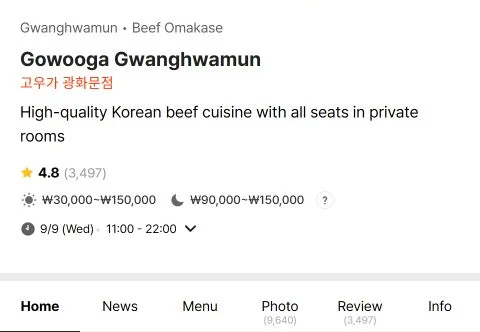
Step 3 — Read the restaurant page before pressing Reserve
A current public restaurant page can show a description, menu, price range, hours, notices, available dates, and a Reserve button. These fields belong to the restaurant and can change independently. Use the live page as the operational source; this guide intentionally does not reproduce a restaurant’s promotional photography.
Open every relevant notice. Restaurant rules can include a fixed reservation release date, a deposit per person, strict changes or cancellation fees, a late-arrival cutoff, no added guests, required menu selection, age restrictions, stairs or accessibility limits, and dietary constraints.
Never copy a policy from a different restaurant. A policy visible in one listing is evidence only for that listing at that time.
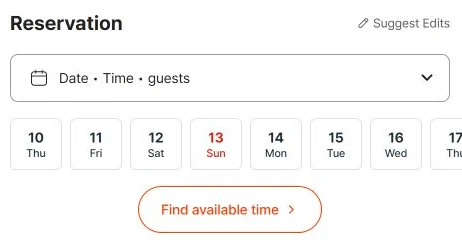
Booking for one person
Set the real party size before choosing a time. If one guest cannot be selected, or slots appear only for two, ask the restaurant through its listed contact whether it accepts a solo reservation. Do not book for two and arrive alone without the restaurant’s agreement.
2인분 이상 means a minimum of two portions; 2인 이상 refers to at least two people. Check whether the rule applies to a particular dish or to the booking itself. Ask: 혼자 식사할 수 있나요? 최소 주문은 몇 인분인가요? — Can I dine alone? What is the minimum number of portions?
The official Global-service guide explains the visitor signup and deposit route, but it does not guarantee one-person tables at every restaurant. Confirm the exact branch, menu and price before paying a deposit.
Step 4 — Sign up without a Korean phone number
KTO’s June 2026 guide says CATCHTABLE Global currently supports Google, Apple, or email signup without a Korean phone number. Use an email address you can access during the trip because confirmations and waitlist updates may arrive there.
Record:
- which login method you used;
- the exact email account;
- the restaurant and branch;
- local Korea date and time;
- guest count; and
- any reservation identifier displayed after completion.
Do not publish or share a screenshot containing your email, account name, reservation ID, payment details, phone number, special request, or precise future itinerary.
Step 5 — Treat the deposit as a restaurant-specific contract
KTO states that CATCHTABLE Global can accept foreign-issued cards for required reservation deposits. That does not mean every card will be approved or every deposit follows the same refund pattern.
Before payment, capture in a private note:
- deposit amount and whether it is per person or per table;
- whether it is deducted from the bill, refunded after the visit, or handled another way;
- the last fee-free cancellation or change time in Korea Standard Time;
- the fee after that deadline;
- the late-arrival and no-show rule; and
- the card and currency actually shown at checkout.
If the issuer authentication fails, stop after one clean retry. Check the issuer app, online-payment setting, available balance, and 3-D Secure path; then switch to a second card or the restaurant’s official alternative. Use the broader foreign-card guide for payment recovery.
Step 6 — Separate reservations from waitlists
The current KTO guide describes three possible states:
- Reservation: choose an available date and time and complete any required deposit.
- Remote waitlist: join away from the venue, monitor the queue, and arrive within the venue’s current grace period.
- On-site waitlist: join through the restaurant’s local tablet or instructions after arrival.
Waitlists do not guarantee a table at a particular time. Do not join remotely unless your group can reach the venue quickly, your notifications and email work, and you know what happens if your number is called early.
Step 7 — Confirm dietary and accessibility needs before paying
A reservation system can transmit a request, but it cannot guarantee that the kitchen or building can accommodate it.
For a serious allergy, religious restriction, vegan/vegetarian need, wheelchair access, stroller, child seat, private room, or large group:
- read the restaurant’s current notice and menu;
- put the request in the designated field if available;
- use the restaurant’s documented email, phone, WhatsApp, or concierge path for confirmation; and
- do not treat silence as acceptance.
Use this concise message:
Hello. I have a reservation for [name], [date/time], [number of guests]. One guest has [allergy/accessibility need]. Can the restaurant safely accommodate this? Please confirm before we travel to the restaurant.
Korean support phrase:
안녕하세요. [날짜/시간]에 [이름]으로 [인원]명 예약했습니다. 일행 중 한 명이 [알레르기/접근성 요청]이 있습니다. 가능한지 방문 전에 확인 부탁드립니다.
Step 8 — Save the live confirmation and arrival plan
Keep the live reservation record and confirmation email accessible. Separately save a privacy-safe note with the Korean restaurant name, address, date, time, guest count, station exit, and official contact route.
Do not rely on a publicly shared screenshot as proof of reservation ownership. If the live record fails, show staff the account’s reservation page or confirmation email and ask them to verify the booking name.
Plan to arrive early enough to find the exact floor and entrance. “Fifteen minutes late” is a common example, not a universal grace period; use the rule on your actual booking.
If the restaurant is full or missing
Use this fallback ladder:
- Try another date, time or branch in the same official service, keeping the party size accurate.
- Check whether remote or on-site waitlisting is offered.
- Use the venue’s documented email, phone, WhatsApp, hotel concierge, or official social account.
- Ask the 1330 Korea Travel Helpline for multilingual assistance with public visitor information; it cannot create inventory or override a restaurant policy.
- Choose a nearby fallback restaurant and keep the original venue for another day.
Avoid unofficial reservation sellers, transferred accounts, screenshots sold as tickets, or requests to send full card details over chat.
Common failure points
Swipe or scroll to see all columns.
| Failure | Likely boundary | Recovery |
|---|---|---|
| Korean-number prompt appears | Domestic flow or a restaurant-specific service | Return to the official Global site or use the venue’s documented foreigner route |
| Wrong branch | Similar English name or map result | Verify Korean name, address, district and floor before payment |
| No Reserve button | Full, not released, waitlist-only, or unsupported restaurant | Try another date or read the listing’s current contact/waitlist route |
| Foreign card rejected | Issuer, balance, authentication, network or merchant | One clean retry, issuer check, second card, then official alternative |
| Deposit refund seems late | Restaurant policy and card-processing time differ | Preserve the policy and confirmation, wait the stated period, then contact the official support route |
| Party size changes | Capacity and deposit are tied to the booking | Modify through the service or contact the restaurant before arrival; do not split bookings without permission |
| Dietary request is unanswered | Request was recorded but not confirmed | Contact the restaurant directly and choose a safe fallback if confirmation is unavailable |
| Queue moves faster than expected | Remote waitlist is not a fixed reservation time | Stay close, monitor email/app, and follow the venue’s current grace rule |
Compatibility details and limits
Swipe or scroll to see all columns.
| Check | Status |
|---|---|
| Korean phone number | Not required for the checked CATCHTABLE Global account route; other booking systems can differ |
| Korean ID | Not documented as required for the checked Global flow |
| Foreign-issued card | Supported for deposits through the checked Global flow; issuer approval and restaurant policy still apply |
| English support | Available; KTO reported 20 languages in June 2026 |
| Field-tested by Korea Untangled | No — official sources and current public screens only |
FAQ
Can I book every Korean restaurant without a Korean phone number?
No. The checked CATCHTABLE Global flow avoids a Korean phone-number requirement, but not every restaurant participates and other domestic services may use different verification.
Does a foreign card guarantee the reservation?
No. The platform supports foreign-issued cards for deposits, but the issuer, network, authentication, available balance, restaurant policy, and current checkout still determine success.
Is the deposit always refunded?
No universal rule should be assumed. Some restaurants deduct it from the bill, some return it after the visit, and cancellation or lateness can forfeit some or all of it. Read the exact booking policy.
Can I walk in when the app shows full?
Possibly, but not reliably. Some restaurants keep non-reservable seats or on-site waitlists; others are reservation-only. Use the venue’s own current notice.
Can a hotel concierge book for me?
Sometimes. It is a strong fallback for venues that accept concierge, email or phone requests. Ask who owns the booking, how the deposit is handled, and where confirmation will be delivered.
Current conditions checked on October 29, 2026
Rechecked Global signup, foreign-card deposits, reservation/waitlist distinctions and the current legal links. A zero-deposit reservation can still require a registered payment method and carry a cancellation or no-show charge. Read the exact restaurant’s conditions before confirming; no reservation or deposit was made.
Official sources
| Source | Use |
|---|---|
| CATCHTABLE Global | Current public search, discovery and restaurant-detail interface |
| KTO: CATCHTABLE booking and waitlist guide, June 23, 2026 | No-Korean-number login routes, foreign-card deposits, reservation and waitlist distinctions, 20-language statement |
| KTO CATCHTABLE Global service page, May 14, 2026 | Nationwide service summary and international visitor boundary |
| CATCHTABLE Global Terms of Service | Current service terms; recheck before relying on any platform-wide rule |
| CATCHTABLE Global Privacy Policy | Current privacy terms for account and booking data |
| CATCHTABLE Global on Google Play | Current Android publisher, no-Korean-number claim, optional-permission boundary and update record |
| CATCHTABLE Global on the Apple App Store | Current iPhone publisher, language support, version history and privacy disclosure |
| NAVER foreign-passport verification help | Eligibility and steps for the optional NAVER reservation or ordering verification flow |
| 1330 Korea Travel Helpline | Multilingual visitor-information fallback |
Change log
- 2026-10-29 — Rechecked Global signup, foreign-card deposits, reservation/waitlist distinctions and the current legal links. A zero-deposit reservation can still require a registered payment method and carry a cancellation or no-show charge. Read the exact restaurant’s conditions before confirming; no reservation or deposit was made. Official documents were reviewed. No purchase, payment, booking, journey, app onboarding or physical-device test was performed.
- 2026-10-01 — Added a separate NAVER passport-verification route for restaurant bookings, with the official source and clear untested limits. CATCHTABLE flow was not retested.
- 2026-09-17 — Rechecked Global public screens and login options, current terms/privacy, both KTO guides, app disclosures and 1330. Confirmed the visitor signup, deposits, separate waitlists and restaurant-specific rules. Dated screenshots remain examples; no account, reservation, payment, queue, contact, refund or meal test.
- 2026-09-16 — Added focused recovery steps and clarified traveler conditions; corrected the Galaxy image description and the police lost-property route where applicable. Sources for the amendments were checked today. The Guide-wide verification date and field-test status are unchanged.
- 2026-09-10 — Aligned the quick answer and added a dated, scoped official-source check. The full-guide verification date and field-test status are unchanged.
- 2026-09-10 — Added contextual photographs and instructional screenshots with source and privacy notes. This media update does not change the information-verification date or field-test status.
- 2026-09-01 — Removed the generic AI illustrations and shortened the verification note. The factual guidance, official-source status, and 2026-08-13 verification date did not change.
- 2026-08-13 — Initial official-source guide created from the current CATCHTABLE Global service and June 2026 KTO guidance. Added no-Korean-number signup, reservation versus waitlist decisions, foreign-card deposit boundaries, restaurant-specific cancellation and arrival controls, dietary and accessibility confirmation, failure recovery, and three clearly disclosed AI-generated illustrations. Third-party UI captures remain research-only because commercial republication permission was not confirmed. No account, card, deposit, reservation, queue, contact, refund, visit or meal was independently tested.
Official-source checked Checked
The listed official sources were checked for this version of the guide.
Official-source review · 2026-10-29
Rechecked Global signup, foreign-card deposits, reservation/waitlist distinctions and the current legal links. A zero-deposit reservation can still require a registered payment method and carry a cancellation or no-show charge. Read the exact restaurant’s conditions before confirming; no reservation or deposit was made.
english.visitkorea.or.kr · play.google.com · www.catchtable.net · www.catchtable.net · www.catchtable.net
Official documents were reviewed. No purchase, payment, booking, journey, app onboarding or physical-device test was performed.
- Next review
- Change rate
- Reviewed every 30 days
- Sources checked
- 11