Official-source checked
The short answer
Use an international card for ordinary purchases, and keep KRW cash for transport-card loading. Carry a second usable card in case the first is declined.
Separate four situations: a shop purchase, a transport-ticket machine, a bus or subway gate, and an online checkout. A machine accepting your foreign card does not mean you can tap that card at a gate or reload basic Tmoney with it. For online bookings, start with the operator’s official English or Global channel.
Trying to pay with Amex through an app? Check wallet and restaurant acceptance first.
- Korean phone number
- Varies by case
- Foreign-issued card
- Partially supported
- Korean ID
- Not required
- English support
- Partial English
In this guide

The simple rule: separate four payment situations
Do not ask only “Does Korea accept foreign cards?” Ask which payment situation you are facing.
Swipe or scroll to see all columns.
| Situation | Safe expectation | What to carry or check |
|---|---|---|
| Ordinary store, restaurant, hotel, or attraction | Foreign cards are widely accepted, but an individual terminal, network, issuer, or merchant can still fail | Primary card, backup card, and a small cash reserve |
| Transport ticket purchase | Many official counters and supported machines accept foreign cards, but machine and product support differ | Read the machine labels; use a staffed counter or the operator's official booking channel if needed |
| Bus, subway, or AREX gate tap | A foreign bank card is not the normal direct-tap method in the checked 2026 visitor guide | Use Tmoney or the exact ticket/pass required for that service |
| Korean website or app checkout | Offline acceptance does not predict online compatibility | Use an official global channel; expect issuer authentication and sometimes local-phone limits |
This separation prevents the most common mistake: seeing a Visa logo at a hotel and assuming the same card can tap a subway gate, load basic Tmoney, and pass every Korean online checkout.
Before departure: build a payment stack, not a single-card plan
Prepare two different cards
Take two usable international cards if possible. A second card is more useful when it differs by issuer or network, because one issuer's fraud control or one network path can fail while another succeeds. Store the backup separately from the primary card.
Before departure:
- Confirm that each card is enabled for international in-person and online use.
- Check whether your issuer asks for a travel notice.
- Confirm how the issuer completes online authentication, including app approval, text message, one-time password, or biometrics.
- Make sure you can access the issuer app and emergency number abroad.
- Know the card's foreign-transaction, cash-advance, and ATM fee rules.
- Confirm or reset the card PIN if the issuer supports one.
- Save only non-sensitive issuer contact details; never store the full card number, security code, or PIN in a travel note.
Visa and Mastercard describe travel notices, issuer controls, PINs, ATM fees, and online identity checks as issuer- and card-dependent. The logo on the card is therefore not a guarantee that a particular transaction will be approved.
Carry a modest KRW cash reserve
Cash is not the main payment method for most visitors, but it is still an important fallback. Carry enough for:
- a basic Tmoney card and initial top-up;
- a small meal or purchase if both card attempts fail;
- a machine or merchant that is cash-only; and
- one trip to a staffed counter, exchange office, or alternative transport option.
Do not carry your whole trip budget in cash. The goal is recovery capacity, not a cash-only trip.
Where foreign cards usually work
The Seoul Metropolitan Government says credit cards can be used in most stores, restaurants, hotels, and tourist destinations nationwide, including major international networks. The Korea Tourism Organization gives the same broad direction but warns that some stores may not provide card service.
That supports a practical default:
- try your primary foreign card at a mainstream merchant;
- check the amount and currency before approving;
- allow one clean retry if staff changes the reader or insertion method; and
- switch to the backup card or cash instead of repeating a failing transaction many times.
Contactless acceptance, mobile-wallet support, signature, and PIN requirements can differ even at a merchant that accepts the physical card. Follow the terminal and staff prompt; do not force a tap when the reader asks for insertion.
Can an app make my Amex work in a Korean restaurant?
Do not assume that adding Amex to an app will make a restaurant accept it. Wallet setup and successful payment at the restaurant are separate checks. If you already have a backup Visa or Mastercard, bring the physical card and confirm an accepted payment method before ordering.
This applies whether you carry a physical Amex or prefer phone payments. First find out what the restaurant accepts and whether your existing backup works before obtaining another payment product.
Check three things before relying on a wallet
- Your card: Does your card issuer support that wallet for your card and country of issue? A supported card network logo is not enough.
- Your phone: Does the wallet support your device and account region, and has this card actually been added successfully?
- The restaurant: Does its terminal support the wallet’s payment method and the underlying card network?
Amex’s Samsung Pay guidance covers eligible cards and compatible devices at participating merchants; its US guidance cannot establish eligibility for every foreign-issued Amex. Amex’s Apple Pay merchant guidance likewise requires the relevant merchant acceptance. Neither is evidence that a wallet bypasses a restaurant’s Amex restrictions. Check your own issuer’s instructions before departure. Amex Samsung Pay guidance; Amex Apple Pay guidance.
What about topping up a Korean prepaid card with Amex?
There are two different transactions: funding the prepaid card and spending its balance. A product that works for restaurant payments does not necessarily let you fund it with Amex.
For example, WOWPASS’s official English homepage currently names Mastercard, JCB and VISA (PayPal) for mobile top-up. That page does not establish an Amex top-up route. Its omission is not proof that Amex can never work through any future or separate channel; it is a reason not to build your trip around that assumption. WOWPASS official payment information.
Before paying to obtain or fund any prepaid product, confirm the exact funding method inside the official service, the total fees and exchange rate shown, and how unused money can be recovered. Stop if the only funding method available is one you do not have. Do not repeatedly fund an unfamiliar wallet just to test a restaurant payment.
A practical sequence at the restaurant
- Before ordering, show the card. Ask specifically about Amex; “Do you take cards?” may not answer the network question.
- If Amex is not accepted, confirm the backup. Show your physical Visa or Mastercard, or ask whether KRW cash is accepted. If none of your methods is accepted, settle that before ordering.
- If a payment attempt fails, ask what the terminal says. A decline can have several causes. A retry makes sense only after the cashier has checked the first attempt and agrees on the next method.
- Check for a possible duplicate before switching. A bank notification alone may not explain whether the merchant completed, cancelled, or only authorised the transaction. Ask for the payment or cancellation record and keep both if another method is used.
If you already carry another debit or credit card, confirm it with the merchant as a fallback. A “no foreign transaction fee” account does not by itself guarantee merchant acceptance or make a home-currency conversion offer free. Read the currency and total before approving payment.
Swipe or scroll to see all columns.
| Show this Korean phrase | Meaning |
|---|---|
| 주문 전에 확인하고 싶어요. 아메리칸 익스프레스 카드로 결제할 수 있나요? | Before ordering, can I check whether you accept American Express? |
| 안 되면 이 비자 카드나 현금으로 결제할 수 있나요? | If not, can I pay with this Visa card or cash? |
| 다시 결제하기 전에, 첫 결제가 완료됐는지 확인해 주세요. | Please check whether the first payment completed before I pay again. |
This section’s official sources were checked October 29, 2026. Wallet eligibility and individual restaurant acceptance were not tested. For an unsuccessful transaction, continue with the payment-recovery steps below.
Transport: buying a ticket is different from tapping a gate
The current official visitor-transport matrix draws a clear line between paying for a ticket and using a foreign bank card as the fare medium.
Swipe or scroll to see all columns.
| Transport task | Foreign-card status in the checked official guidance | Practical action |
|---|---|---|
| Seoul bus or subway gate | Not the normal direct-tap method | Use a regular transportation card such as Tmoney |
| Basic Tmoney purchase or top-up | Foreign card not accepted on the standard visitor route; Korean-won cash | Buy and load through an official convenience-store or station location |
| Seoul single-journey ticket | Supported at designated new machines on Lines 1–8 | Confirm the machine is one of the supported international-card machines |
| Climate Card 1–7 day short-term pass | Supported at designated new Seoul machines | Check current product, machine, and service-fee information |
| AREX or high-speed rail ticket | Foreign cards are supported at specified machines, counters, or official channels in the checked guidance | Use the operator's live official path and read the payment labels; use the post-September 1, 2026 KORAIL booking route |
| Taxi card reader | Foreign cards supported in the checked visitor matrix | Confirm the fare and keep a backup in case the terminal or issuer fails |
| Airport limousine or other bus | Product and operator differ | Check that exact bus's official counter, machine, or onboard rule |
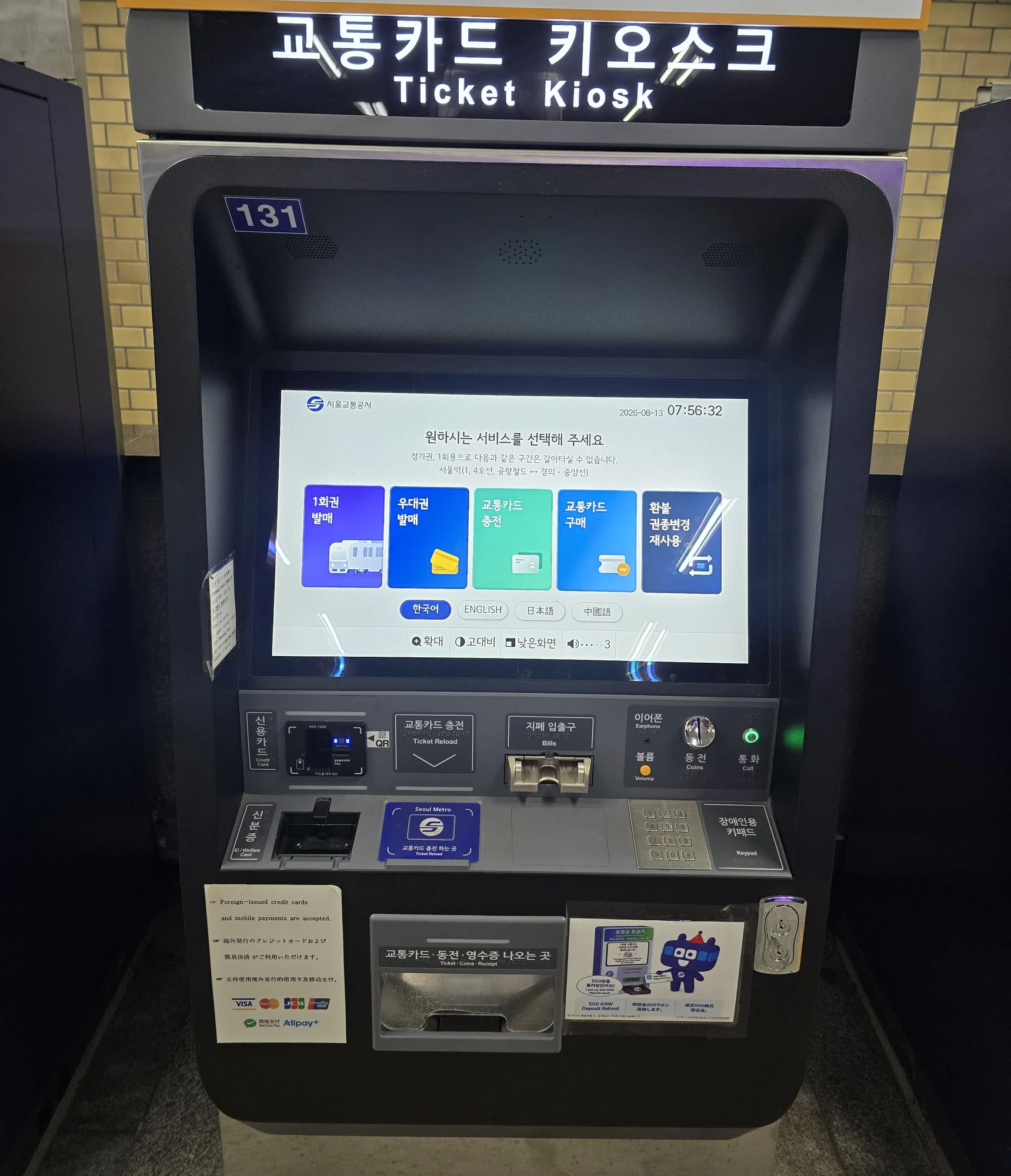
Seoul's March 2026 announcement says 440 new machines at 273 stations on Lines 1–8 accept internationally issued Visa and Mastercard cards for single-journey tickets and Climate Card short-term products, with an average service fee of about 3.7%. This is a machine-payment exception, not proof that a foreign card can tap every subway gate.
Basic Tmoney still needs a cash plan
A basic physical Tmoney card is the low-complexity transit fallback for many visitors, but the checked KTO transport guide labels its ordinary purchase and top-up path as Korean-won cash only. Do not confuse that rule with the separate foreign-card support for newer single-journey and Climate Card machines.
Use the detailed airport Tmoney purchase and top-up guide for the arrival workflow, and compare T-money, Climate Card, and WOWPASS before choosing a transport-payment strategy.

Train and airport-ticket channels
The official visitor matrix checked on August 12 names designated AREX, KTX, and SRT machines and counters as foreign-card purchase routes. AREX separately lists supported overseas networks for its Express Train ticket. These are ticket purchases, not direct foreign-card fare taps.
High-speed rail booking from September 1, 2026: Current KORAIL/SR notices direct travelers on the former SRT routes, including Suseo, to Korail+ or KORAIL. Start with the official English reservation page or a station counter. SR says its full app/site booking service ended August 31 and temporary nonmember access may remain. Do not assume an old SRT workflow is still the primary route. Check the live departure, fare, payment and refund conditions; this review did not complete a booking.
For KORAIL online purchases, the official notice says overseas-issued cards must be enrolled for online 3-D Secure authentication. Approval still depends on the card issuer. If the official global checkout fails, contact the issuer or use a supported station counter rather than switching to an unofficial reseller solely to bypass authentication.
Machine labels matter. Even inside Seoul Metro, some standard ticket and reload machines state that their card reader accepts only cards issued in Korea. Use the exact designated foreign-card machine or operator channel instead of assuming all nearby machines share the same payment options.

Online payments: use the official global route
A Korean merchant may accept your foreign card in person while its domestic website rejects the same card. Possible barriers include:
- Korean phone-number verification;
- a domestic-only payment gateway;
- an issuer authentication step you cannot receive abroad;
- a billing-address or card-country restriction; or
- a product that is sold to foreign visitors only through a separate global page.
This is why “my card worked at the hotel” does not answer “will this booking site work?”
Use this order:
- Start on the operator's official English or global page.
- Confirm that it explicitly supports overseas-issued cards.
- Complete Visa Secure, Mastercard Identity Check, or the issuer's equivalent when prompted.
- If authentication does not arrive, check the issuer app and contact the issuer.
- If the domestic page requires a Korean phone number, look for an official foreigner channel instead of entering someone else's identity or phone.
- Keep a screenshot of the booking confirmation—not the full card number—and verify the charge in the issuer app.
KTO's current CATCHTABLE Global and Shuttle examples show why the distinction matters: the global services were designed to remove Korean-phone or foreign-card barriers that can exist in domestic reservation and delivery flows. Those examples do not guarantee every restaurant, app, or delivery area.
Dynamic Currency Conversion: read the choice before accepting
At a merchant or ATM, you may be offered a choice between Korean won and your card's home currency. The home-currency option is Dynamic Currency Conversion, or DCC.
Visa says the offer should clearly show:
- the amount in KRW and the cardholder's currency;
- both currency symbols;
- the conversion rate; and
- any additional fee or markup.
The merchant or ATM must let you accept or decline the conversion and must not choose for you. There is no honest universal claim that one selection is always cheaper for every card. Compare the disclosed DCC cost with your issuer's foreign-transaction and exchange-rate terms. If the required information is missing or you feel pressured, Visa recommends declining the conversion and reporting the issue to the issuer.
Useful phrases:
- 원화로 결제해 주세요. — Please charge me in Korean won.
- 해외 발급 카드도 되나요? — Do you accept an overseas-issued card?
- 다른 카드로 해 볼게요. — I will try another card.
- 현금으로 결제할게요. — I will pay in cash.
ATM cash withdrawal as a fallback
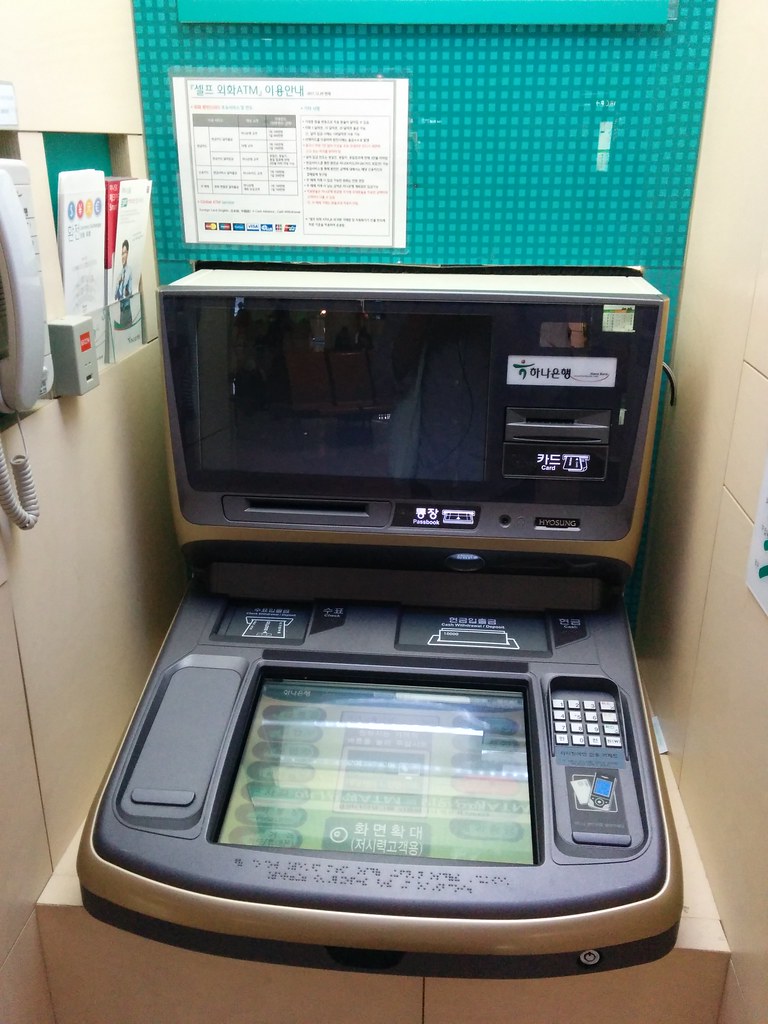
Look for a machine marked Global and for a network logo that matches your card. A matching logo is only a starting clue: the ATM, local operator, network, and issuing bank can each impose support rules, limits, or fees.
Before confirming a withdrawal:
- Review the withdrawal amount in KRW.
- Read any operator fee shown on screen.
- Review any DCC offer before choosing a currency.
- Remember that the issuer may add its own ATM or foreign-transaction charge.
- If using a credit card rather than a debit card, confirm whether the transaction is treated as a cash advance with separate fees or interest.
- Take the cash and card before leaving, and keep the receipt until the issuer transaction is correct.
Convenience-store ATMs can be useful, but Seoul's official visitor information warns that their fees may be higher. Try a bank or airport Global ATM when practical, and withdraw only the amount you reasonably need.
If a payment fails: use this recovery ladder
1. Read the screen and verify the basics
Check the amount, currency, card orientation, and whether the terminal requests insert, tap, swipe, signature, or PIN. Cancel if the total or currency is wrong.
2. Try one clean retry
Remove the card, wait for the terminal to reset, and follow the reader's requested method. Repeated rapid attempts can create duplicate authorizations or trigger issuer controls.
3. Switch payment method
Use the backup card, then cash. For transport, switch to the correct ticket, Tmoney, supported machine, or staffed counter rather than forcing a foreign-card tap.
4. Separate merchant failure from issuer failure
If the card works elsewhere, the merchant terminal or payment channel may be the problem. If it fails across unrelated merchants, check the issuer app and contact the issuer.
5. Preserve evidence without exposing card data
Keep a merchant receipt, booking confirmation, date, amount, and merchant name. Do not photograph or publish a full card number, security code, PIN entry, passport, or one-time authentication code.
6. Escalate suspicious or duplicate charges
Contact the issuer through its official channel. Do not hand the card or phone to an unknown helper, and do not share a verification code with someone claiming they can “unlock” the payment.
Compatibility snapshot
Swipe or scroll to see all columns.
| Requirement | Status | Meaning for this guide |
|---|---|---|
| Korean phone number | Varies by case | Not required for ordinary in-person card use, but some domestic online bookings and apps can require local phone verification |
| Korean bank card | Not required | Foreign-card support remains transaction- and issuer-specific |
| Korean ID | Not required for ordinary card payment | A passport can be required for exchange, tax refund, prepaid tourist products, or identity-checked services |
| English support | Partial | Major travel channels and machines often offer English; merchant staff and domestic checkout screens vary |
| Foreign-issued card | Partial | Widely accepted at mainstream merchants, with important transport, top-up, machine, issuer, and online exceptions |
Costs and fee boundaries
There is no single “foreign-card fee in Korea.” A transaction can involve several independent costs:
- the merchant's displayed price;
- a machine or service fee, where disclosed;
- a DCC markup if you accept home-currency conversion;
- the issuer's foreign-transaction fee;
- an ATM operator fee;
- an issuer ATM fee; and
- a cash-advance fee or interest when a credit card is used for cash.
The checked Seoul announcement gives one product-specific example: the designated international-card machines for Climate Card short-term passes and single-journey tickets had an average service fee of approximately 3.7% when announced in March 2026. Do not apply that percentage to ordinary shops, taxis, trains, or ATMs.
Frequently asked questions
Can I travel in Korea without cash?
Many ordinary purchases can be made by card, but a fully cashless plan is fragile. Basic Tmoney purchase and top-up, a cash-only merchant, or a failed card or machine can still require KRW. Carry a modest fallback amount.
Can I tap my Visa or Mastercard directly on a Seoul subway gate?
Do not assume so. The checked 2026 KTO guide tells visitors to use a regular transportation card at subway and bus readers. Seoul's new foreign-card support applies to designated ticket machines for specific products, while direct open-loop acceptance is part of a staged roadmap.
Why did my card work in a shop but fail online?
The online payment channel can require a supported overseas-card gateway, 3-D Secure authentication, or local phone verification. Use the official English or global channel and contact the issuer if authentication fails.
Should I choose KRW or my home currency?
Review the complete price. A home-currency DCC offer includes its own exchange rate and may include a markup, while a KRW transaction is converted under your issuer's terms. Compare the disclosed costs; if the DCC details are missing or the choice is pressured, decline that conversion.
Does a Global ATM logo guarantee my card will work?
No. It is a recognition clue, not a guarantee. Match the card-network logo, read the machine's fees and limits, and keep a second card and another withdrawal location in reserve.
Is a rejected transaction always a sign that foreign cards are not accepted?
No. The cause can be the merchant, terminal, network, issuer, fraud control, PIN, authentication, balance, machine, or product. Use one clean retry, then switch methods and check the issuer rather than repeatedly forcing the transaction.
Official sources
- Seoul Metropolitan Government — Currency Exchange and payment methods
- Korea Tourism Organization — International Visitors' Use of Public Transportation and Booking/Payment Services
- Seoul Metropolitan Government — International cards at designated Climate Card and single-journey machines
- Seoul Metropolitan Government — Open-loop payment roadmap
- AREX — Express Train guide and payment networks
- KORAIL — Overseas-card and 3-D Secure notice
- KORAIL — Korail+ launch and September 1 integrated booking
- KORAIL — September high-speed rail integration
- SR — SRT app and website transition notice
- Seoul Metropolitan Government — Taxi information
- Visit Seoul — Money and Global ATM guidance
- Visa — Dynamic Currency Conversion
- Visa — Travel preparation
- Mastercard — Cardholder travel and ATM FAQ
- KTO — CATCHTABLE Global payment and phone boundary
- KTO — Shuttle delivery payment and phone boundary
- Visa Secure
- Mastercard Identity Check
Change log
- 2026-10-29 — Rechecked the distinction between merchant payment, ticket purchase, transit-gate tapping and online authentication. The cash-first physical Tmoney rule and designated Climate Card/single-ticket machine exception remain. DCC must show the currencies, exchange rate and charges and leave the choice to the customer; issuer and merchant approval still vary. Official documents were reviewed. No purchase, payment, booking, journey, app onboarding or physical-device test was performed.
- 2026-09-29 — Added Amex wallet and restaurant acceptance checks, prepaid-funding limits and duplicate-payment precautions. Amex and WOWPASS sources checked; no wallet or merchant transaction tested. Guide-wide verification date unchanged.
- 2026-09-17 — Rechecked Seoul/KTO transport and payment guidance, AREX, current KORAIL/SR notices and reservation entry, Visa authentication/DCC/travel guidance, Mastercard FAQ including bank authentication, and KTO visitor services. Updated the September rail transition and Mastercard FAQ link. No card, ATM, checkout, authentication, fare tap, refund or dispute was tested.
- 2026-09-10 — Aligned the quick answer and added a dated, scoped official-source check. The full-guide verification date and field-test status are unchanged.
- 2026-09-09 — Clarified the opening instructions and related information; retained existing images, sources and the Guide-wide verification date.
- 2026-08-25 — Added the date-bound KTX/SRT booking-channel transition effective September 1 from KORAIL and SR official notices. The Guide-wide verification date remains August 12 because no card, checkout, ticket, station, app, machine, counter, payment, refund, or integrated service was independently tested.
- 2026-08-12 — Initial official-source decision guide created. Added the mainstream merchant rule; ticket-purchase versus gate-tap matrix; basic Tmoney cash boundary; designated Seoul foreign-card machine exception; AREX, KTX, taxi, and online-authentication limits; DCC choice; Global ATM and cash-advance cautions; a six-step failure ladder; and five rights-cleared actual photographs. No card, issuer, terminal, ATM, transport reader, merchant, checkout, PIN, 3-D Secure flow, cash withdrawal, fee, or dispute was independently tested, and no AI-generated or recreated interface imagery was used.
- 2026-08-13 — Replaced two older third-party station-machine photographs with author-owned Seoul Metro photos captured that morning: a kiosk whose notice states foreign-issued-card support and a standard machine labeled for Korea-issued cards only. No payment, card approval, product, fee, or transaction was independently tested.
Official-source checked Checked
The listed official sources were checked for this version of the guide.
Official-source review · 2026-10-29
Rechecked the distinction between merchant payment, ticket purchase, transit-gate tapping and online authentication. The cash-first physical Tmoney rule and designated Climate Card/single-ticket machine exception remain. DCC must show the currencies, exchange rate and charges and leave the choice to the customer; issuer and merchant approval still vary.
english.visitkorea.or.kr · english.seoul.go.kr · www.visa.com · www.visa.com · www.korail.com
Official documents were reviewed. No purchase, payment, booking, journey, app onboarding or physical-device test was performed.
- Next review
- Change rate
- Reviewed every 30 days
- Sources checked
- 18