Official-source checked
The short answer
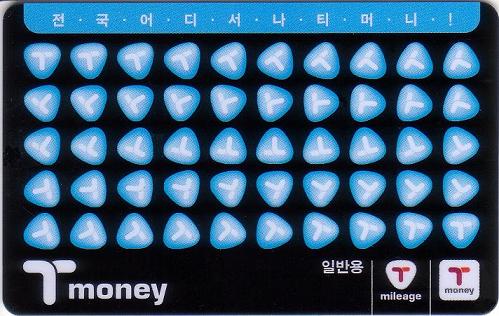
Bring KRW cash. At your terminal’s public-area convenience store, ask for a basic Tmoney card and a cash top-up. The card price and usable balance are separate; check the loaded balance before leaving.
Use a funded Tmoney card at the AREX All-stop transit gate. The AREX Express needs its own reserved QR ticket. Confirm store stock and payment options on arrival.
Already paid but the top-up is missing? Check the balance and recover the transaction.
- Korean phone number
- Not required
- Foreign-issued card
- Partially supported
- Korean ID
- Not required
- English support
- Partial English
In this guide


Check the money before leaving the counter
This is a calculation example for one existing physical card, not a purchase we performed. Suppose its starting balance is ₩2,000, you request a ₩10,000 load and hand over ₩20,000 with no other purchase.
| Check | Calculation |
|---|---|
| Expected card balance | ₩2,000 + ₩10,000 = ₩12,000 |
| Expected cash change | ₩20,000 − ₩10,000 = ₩10,000 |
| If buying a new card | Subtract the separately quoted card price from the change. That price is not transport balance. |
Ask to see the balance of that exact card, check the change separately, and keep the receipt until the first ride works. If the numbers disagree, ask the same cashier to check the record before paying for another load.
잔액을 확인해 주세요. — Please check the balance.
First decide: All-stop Train or Express Train
Buying Tmoney is useful only when it matches the next transport task. Airport Railroad operates two different ticket systems.
Swipe or scroll to see all columns.
| Your next ride | What you need | How to enter |
|---|---|---|
| AREX All-stop Train | A funded Tmoney card or another valid regular-rail ticket | Tap at the regular transit gate |
| AREX Express Train | A separate reserved Express ticket | Scan the ticket’s QR code at the Express gate |
| Airport bus, taxi, or another route | The payment method required by that operator | Follow the operator’s current ticket or payment instructions |
The official AREX All-stop overview identifies prepaid transportation cards as a regular ticket method. The official Express ticket guide shows a separate purchase flow and QR ticket. If you have not chosen a route yet, compare the full trip in the Incheon Airport-to-Seoul guide before loading a large balance.
What to have ready
- Your actual terminal and chosen airport route
- Korean-won cash for the card and first top-up
- A modest first-load amount, a second payment method, and one fallback
- The Korean request saved offline
A Korean phone number, Korean bank card, and Korean ID are not required for this basic cash purchase. A phone can help with maps or an optional balance check, but it is not the primary requirement.
Where to try at Terminal 1
The airport’s current public directory lists CU convenience stores on the public side of the first-floor arrivals area near Exit 2, Exit 5, Exit 11, and Exit 13, each as open 00:00–24:00. These are sensible first places to ask for a basic Tmoney card, but stock and the exact service offered can vary.
Use this wording: “Do you have a basic Tmoney card, and can you load it with cash?” Look for the Tmoney logo and confirm the card itself is not a time pass or a different tourist-payment product.
If the store cannot help, follow the yellow Airport Railroad signs from Arrivals 1F to the B1 Transportation Center. The official Terminal 1 station page lists a Tmoney vending machine at the station. Read the current machine labels before inserting cash because the available functions, language, and payment methods can change.
Where to try at Terminal 2
The airport’s current Terminal 2 directory lists these public-area options as open 00:00–24:00:
- GS25 near Arrival Hall A on 1F
- CU near Exit 10 on 1F
- CU in the center of the public area on 1F
- CU in the center of the B1 Transportation Center
Treat these as places to try or ask, not guaranteed Tmoney stock points. If one branch is out of cards, try another listed branch or continue to the B1 Transportation Center and ask Airport Railroad staff where the current prepaid-card purchase or reload point is.
Unlike Terminal 1, the official material checked for this guide did not explicitly identify a branded Tmoney vending machine at Terminal 2. Do not assume the Terminal 1 machine description applies unchanged. Use the B1 convenience store, read the current ticket-machine labels, or ask station staff.


Step 1 — Get Korean-won cash before buying
The official 2026 KTO transportation guide says foreign-issued credit cards are not accepted for basic Tmoney purchase or top-up. Use cash even if a newer device elsewhere displays card payment: Climate Card and AREX ticket rules are separate.
If you have no won:
- Use an official airport exchange counter or ATM and obtain enough cash for the card and first load.
- If you only need one All-stop Train ride, check the official single-use ticket machine and its displayed foreign-card options instead of forcing a Tmoney purchase.
- If the Express Train fits your route, buy its separate QR ticket through the current official channel; AREX lists supported overseas cards for that ticket flow.
- Keep another payment method for purchases outside the Tmoney balance.
Use the airport’s public-facilities directory to find current exchange and ATM options.
No won yet? iPhone users can try MobileTmoney instead
Tmoney’s own MobileTmoney App Store listing (version 2.4.7, released September 1, 2026) says international users can start without signing up, ride buses and subways with an iPhone or Apple Watch, and top up inside the app through Apple Pay with Mastercard, American Express, UnionPay or JCB. Visa is not on that list. Load the balance inside MobileTmoney: Tmoney’s Apple Pay guide says topping up from the Wallet app itself needs a Korean Hyundai Card.
The listing requires an iPhone XS/XR or later on iOS 17.2+, or an Apple Watch Series 6 / SE (2nd generation) or later. This is a phone-based card; it does not let you reload a plastic Tmoney card with a foreign card. Korea Untangled has not tested it, so check the fee and card acceptance shown in the app before paying, load only what your first rides need, and keep some won as a fallback.
Step 2 — Ask for a basic Tmoney card
Show or say:
티머니 카드 하나 주세요. — Tmoney card, please.
Before paying, confirm three things:
- It is a basic stored-value Tmoney card, not an AREX Express ticket, Climate Card pass, or another prepaid tourist product.
- The quoted amount separates the physical card price from the value being loaded.
- The seller can load the amount you requested with Korean-won cash.
Physical-card price varies by design and seller, and buying the plastic does not mean it already contains usable transit value. If the price seems unexpected, ask how much is for the card and how much will remain as balance.

Step 3 — Choose a modest first load
Official Seoul guidance says a Tmoney top-up can start from KRW 1,000. The right first amount depends on your actual route and how many pay-as-you-go journeys you expect before the next convenient reload.
Estimate the journeys before your next convenient top-up, then subtract the balance already on this card. Keep the plastic-card price separate. For adult Seoul transit and supported AREX All-stop routes, use the Tmoney fare and top-up planner and check its route coverage before using the estimate. Exclude a separately paid AREX Express ticket and journeys you will take with another pass. Confirm current fares and the counter’s accepted load amount before paying.
Avoid treating a large balance as a travel budget. The card price is separate, refunds have outlet-specific limits, and an airport convenience-store refund is not guaranteed.
Step 4 — Pay, load, and verify the balance
At a staffed store, hand over the card and won cash, state the exact load amount, ask the cashier to confirm the balance, and keep the receipt until the first gate tap works.
At a station reload machine:
- Select English if offered and choose the transportation-card reload function.
- Leave the card on the marked reader until the process finishes.
- Insert accepted won notes or coins and confirm the displayed balance before removing the card.
Machine designs differ. The photo below is a current Seoul Metro station recognition example, not an Incheon Airport machine, so do not copy its button positions or payment options blindly. Its labels also show why the exact reader matters: this machine states that its card reader accepts only cards issued in Korea.

The official Mobile Tmoney page also describes reading a physical card with a compatible phone. Treat that as optional; a cashier or station-machine balance display is the simpler airport check.
Step 5 — Use the correct Airport Railroad gate
For the AREX All-stop Train, place the funded Tmoney card flat on the regular transit-gate reader and wait for the confirmation. Keep the same card for entry and exit.
For the AREX Express Train, use the separately purchased reserved ticket and scan its QR code at the Express gate. A Tmoney balance does not replace that Express ticket.
At Terminal 1, the orange Express Train concourse is visually prominent. If you intend to use Tmoney, follow signs for the All-stop Train rather than joining the Express ticket flow. At Terminal 2, follow the station signs to the correct service and confirm with staff if the entrances are unclear.
How to recognize a convenience store without assuming stock
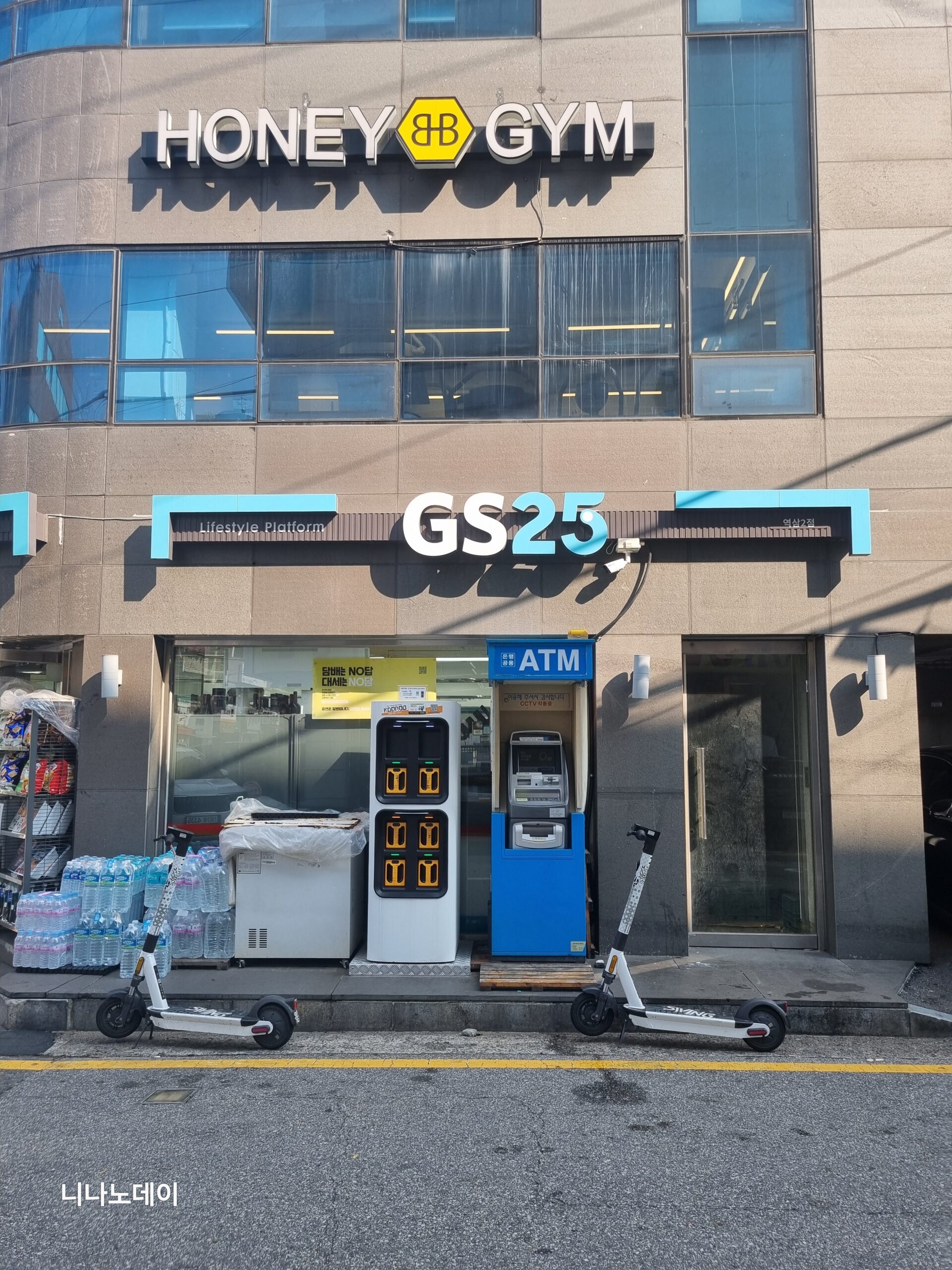
Airport directories list brands and hours, not Tmoney stock, top-up, or refunds. The generic non-airport GS25 photo below helps identify the brand only.

T-money top-up missing? Check the balance before paying again
Check the balance on the physical card, one card at a time, then return to the original shop with the cards and transaction details. A low balance alone does not establish that a cashier kept your money. First separate an incomplete load, a different card, later spending, and the wrong balance screen.
This is the recovery procedure for a basic physical T-money card topped up with cash. For an app payment or another prepaid product, identify the product and payment record first; its support process may differ.
1. Check the balance on the card you topped up
At a staffed T-money reload counter, ask to see the balance without adding money. Alternatively, use a compatible station machine’s balance-check function. If you topped up more than one card, keep them apart and label them A and B in your notes. An app screen is useful only if you know it is showing the transport balance of that exact card, rather than another wallet balance.
Write down each displayed balance and the time you checked it. Compare it with what you remember before the load, allowing for rides or purchases since then. If you did not record the earlier balance, say that clearly: you have a discrepancy to investigate, not proof of a particular missing amount.
2. Reconstruct the cash transaction
For example, if you handed over ₩50,000 to add ₩20,000 to each of two existing cards, with no other purchase, the expected change is ₩10,000. That cash calculation does not by itself show whether either card was loaded.
- Shop: branch name, address, date, and approximate time.
- Request: amount intended for card A and for card B.
- Cash: amount handed over, change received, and any separate purchase.
- Evidence: receipt if available, current balances, and any earlier balance photo or note.
No receipt? Bring the other details anyway and ask whether staff can check the transaction record. Give an approximate time if you cannot remember exactly. Staff may need more information before they can identify the payment or decide whether a correction is due.
3. Ask the original shop to check before doing another load
Show one card at a time and the exact amount you requested for it. Ask staff to compare their record with the card balance and explain any correction. If they propose a new load, clarify whether it corrects the earlier transaction or requires a new payment. After any correction, check both balances again and request a receipt.
Swipe or scroll to see all columns.
| Show this Korean phrase | Meaning |
|---|---|
| 충전하지 말고, 이 카드 잔액만 확인해 주세요. | Please check this card’s balance without topping it up. |
| 두 카드에 각각 2만 원씩 충전을 요청했어요. 충전 내역을 확인해 주실 수 있나요? | I asked for ₩20,000 on each card. Could you check the top-up records? |
| 영수증이 없어요. 결제한 시간은 이때예요. | I don’t have the receipt. This is when I paid. |
| 이건 이전 충전 건을 바로잡는 건가요, 아니면 새로 돈을 내야 하나요? | Does this correct the earlier load, or do I need to pay again? |
4. If the shop cannot resolve it
T-money lists 1644-0088 as its customer-support number. Ask what evidence is needed to investigate a physical-card cash top-up; this guide does not promise English support or a particular refund outcome. For language help or a tourism complaint, use the Korea Tourism Organization’s 1330 service. Its official page also offers online contact options useful when your SIM cannot make calls. Use official channels for card details; do not post card identifiers publicly. T-money contact page; 1330 travel assistance.
If you need to travel before the discrepancy is settled
Record the current balance first. Then arrange only the fare you need: a new, separately documented load with an immediate balance check, or a suitable ticket from the station counter or machine. Keep this payment separate from the disputed transaction. For ordinary physical T-money reloads, prepare KRW cash; a machine accepting foreign cards for some tickets does not establish that it accepts them for T-money reloads. KTO transportation guide.
This section’s official sources were checked October 29, 2026. No disputed top-up or refund was tested in person.
If something goes wrong
Swipe or scroll to see all columns.
| Problem | Likely cause | Safest next action |
|---|---|---|
| No card at the first store | Stock varies | Try another listed branch, then ask Airport Railroad staff for the nearest seller or machine |
| Foreign card refused | Basic Tmoney is cash-first | Obtain won from an official exchange counter or ATM |
| Machine will not read the card | Placement, machine, or card issue | Retry once with the card on the reader, then use a staffed point or ask station staff |
| Balance is lower than expected | Card price and loaded value were confused | Check the receipt and ask the seller to separate the two amounts |
| All-stop gate rejects the tap | Low balance, wrong reader, incomplete load, or card issue | Check the balance at a reload or fare-adjustment machine, then ask staff |
| You reached the Express gate | Express requires a separate QR ticket | Use the All-stop gate or buy the correct Express ticket |
| You have no cash | Safe basic top-up is unavailable | Check a single-use All-stop ticket or Express QR ticket and displayed foreign-card support |
| You loaded too much | Refund paths vary | Stop adding value, spend down eligible balance, or ask an official participating outlet |
Payment, phone, ID, and language boundaries
Foreign-issued cards
Treat basic physical Tmoney purchase and top-up as cash only. Foreign-card support for an AREX ticket, a select newer machine, or the iPhone-only MobileTmoney app (see Step 1) is a different transaction.
Korean phone number and app
A Korean phone number is not required. Mobile Tmoney is optional, not a prerequisite for the physical card; its international mode is the iPhone alternative described in Step 1.
Korean ID
Korean ID is not required for this basic cash purchase. Discount, mobile, or specialized products may differ.
English support
Airport and AREX wayfinding includes English, and some machines offer English. Cashier support and machine flows vary.
Useful Korean phrases
- 티머니 카드 하나 주세요. — Tmoney card, please.
- 2만 원 충전해 주세요. — Please load 20,000 won.
- 카드 가격과 충전 금액이 각각 얼마예요? — How much are the card and the loaded value separately?
- 잔액을 확인해 주세요. — Please check the balance.
- 일반열차 타는 곳이 어디예요? — Where is the All-stop Train entrance?
- 이 카드로 공항철도 일반열차를 탈 수 있어요? — Can I use this card on the AREX All-stop Train?
Price and refund boundaries
Leaving Korea with money on your card? See our Tmoney balance refund guide for counter limits, fees and larger-balance options.
Swipe or scroll to see all columns.
| Item | Current safe interpretation |
|---|---|
| Physical Tmoney card | Price varies by design and seller; loaded value is separate |
| Minimum top-up | KRW 1,000 in the checked 2026 Seoul guidebook |
| Suggested first load | Use the fare for journeys before the next convenient top-up, minus this card’s current balance; keep the card price separate |
| Convenience-store refund limits | The checked Seoul guidebook lists different balance ceilings by chain, but branch participation, fees, and airport availability still need confirmation |
| Airport refund | Not guaranteed; ask the exact branch or official station service point before relying on it |
The checked Seoul guidebook lists refund ceilings of up to KRW 30,000 at CU and emart24, up to KRW 20,000 at several other chains, below KRW 20,000 at GS25, and up to KRW 50,000 at subway information centers. These figures do not prove that an Incheon Airport branch provides the service, and this guide does not promise a fee or a same-day airport refund.
Official sources
| Source | What it was used to confirm | Boundary |
|---|---|---|
| KTO 2026 Korea Transportation Guide | Cash-only basic Tmoney purchase/top-up for visitors, convenience-store network, foreign-card and ticket-machine distinctions | Product details and machine support can change |
| Incheon Airport shopping directory | Current Terminal 1 public-area CU locations and displayed 24-hour operation | Directory does not guarantee Tmoney stock or service |
| Incheon Airport Terminal 2 filtered directory | Current T2 GS25 and CU public-area and B1 listings with displayed hours | Filter state, hours, stock, and branch services can change |
| Incheon Airport convenience and public facilities | Current exchange, ATM, and public-facility lookup | Recheck live location and hours |
| AREX All-stop Train overview | Prepaid transportation-card use on the All-stop Train | Does not make Tmoney valid for the Express Train |
| AREX Terminal 1 station information | T1 station path and listed Tmoney vending-machine facility | T1-specific; not copied to T2 |
| AREX Express ticket guide | Separate Express purchase, overseas-card list, and QR-gate flow; both airport stations in B1 Transportation Centers | Express ticket rules do not govern basic Tmoney top-up |
| Tmoney Mobile Tmoney service page | Optional compatible-phone reading and balance functions | Device, app, account, and regional support may vary |
| MobileTmoney App Store listing | International-user mode without sign-up, Apple Pay top-up with Mastercard, American Express, UnionPay and JCB, and device requirements (version 2.4.7, checked October 16, 2026) | Publisher’s listing; fees, refunds, and acceptance were not tested |
| Tmoney Apple Pay guide | Topping up from the Wallet app itself requires a Hyundai Card | Does not cover every card or device |
| Seoul 2026 Guidebook | Minimum top-up and published refund ceilings | Does not guarantee airport-branch refunds or a fixed fee |
Change log
- 2026-10-29 — Rechecked physical-card cash top-up, airport store listings, refund limits and the separate iPhone MobileTmoney route. Physical-card loading starts at KRW 1,000, with KRW 90,000 per top-up and KRW 500,000 stored-value limits. The international iPhone app route is separate from plastic-card loading and Wallet-only top-up. Official documents were reviewed. No purchase, payment, booking, journey, app onboarding or physical-device test was performed.
- 2026-10-16 — Added the iPhone-only MobileTmoney option documented in Tmoney's App Store listing (international mode without sign-up; Apple Pay top-up with Mastercard, American Express, UnionPay or JCB) and changed the foreign-card status to partial. Basic physical-card purchase and top-up remain cash-only. Source check only; the app was not tested and the September 17 full-review date is unchanged.
- 2026-10-12 — Replaced the blanket KRW 20,000 starting suggestion with a route-and-existing-balance method and linked the site’s fare/top-up planner. This is a scoped editorial improvement, not a full airport-source review or a transaction test; the September 17 full-review date is unchanged.
- 2026-10-06 — Simplified repeated review text and/or added task guidance and clearly labeled calculation examples. Original evidence dates, verification status and test limits are unchanged.
- 2026-09-29 — Added missing cash top-up recovery: separate card balances, reconstruct payment, request a shop record check, and contact official support. Sources for this section checked; no transaction or refund tested. Guide-wide verification date unchanged.
- 2026-09-17 — Rechecked KTO payment matrix, live airport T1/T2 directories, browser-rendered AREX all-stop/Express/T1 guidance, Mobile Tmoney and the rendered Seoul 2026 guidebook refund page. Locations, cash-first separation and published refund ceilings remain consistent. No stock, machine, cashier, card, gate, ride, app or refund test.
- 2026-09-10 — Aligned the quick answer and added a dated, scoped official-source check. The full-guide verification date and field-test status are unchanged.
- 2026-09-09 — Clarified the opening instructions and related information; retained existing images, sources and the Guide-wide verification date.
- 2026-08-12 — Initial official-source draft created for cash-first basic Tmoney purchase and top-up at Incheon Airport, terminal-specific try-or-ask locations, All-stop versus Express gate separation, modest loading, failure recovery, refund limits, and five commercially reusable actual-photo candidates. No store, stock, card, cashier, machine, payment, balance, gate, ride, app, or refund was independently tested.
- 2026-08-13 — Replaced the older 2024 third-party reload-machine photograph with an author-owned current Seoul Metro machine photo captured that morning. It remains a non-airport recognition example, and no airport machine, payment, reload, balance, or card acceptance was independently tested.
- 2026-10-30 — Added a same-language link to the Tmoney refund guide; prior verification scope and date preserved.
Official-source checked Checked
The listed official sources were checked for this version of the guide.
Official-source review · 2026-10-29
Rechecked physical-card cash top-up, airport store listings, refund limits and the separate iPhone MobileTmoney route. Physical-card loading starts at KRW 1,000, with KRW 90,000 per top-up and KRW 500,000 stored-value limits. The international iPhone app route is separate from plastic-card loading and Wallet-only top-up.
pay.tmoney.co.kr · english.visitkorea.or.kr · apps.apple.com · blog.tmoney.co.kr · www.airport.kr
Official documents were reviewed. No purchase, payment, booking, journey, app onboarding or physical-device test was performed.
- Next review
- Change rate
- Reviewed every 30 days
- Sources checked
- 12