Official-source checked
The short answer
Copy the venue’s exact Korean name or full Korean road address from its official page or booking confirmation and paste it into NAVER Map. Add the district or neighborhood if several results appear.
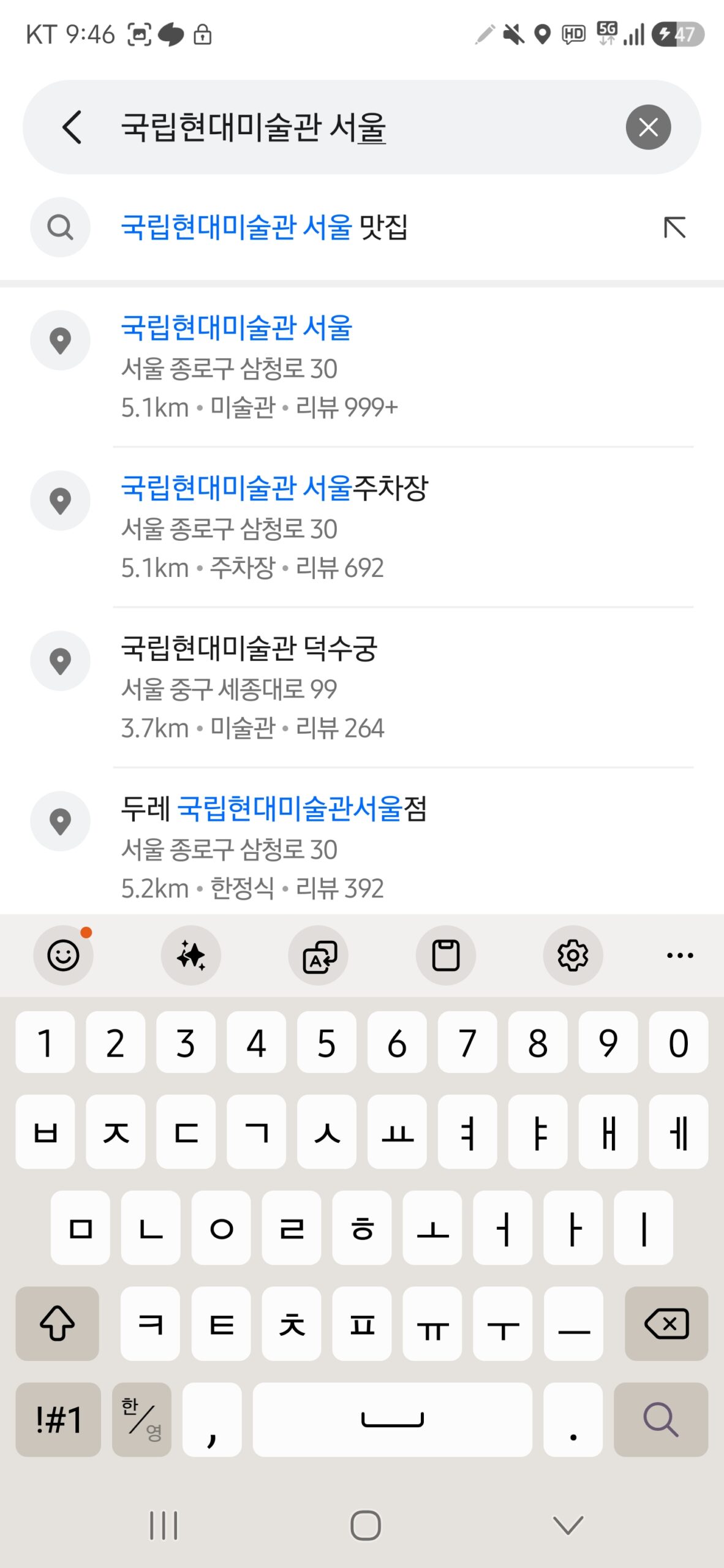
Match the branch, full address and map pin before starting directions. Save the Korean name and address outside the app so staff can help. The two Android screenshots below show specific searches captured on August 13, 2026; they do not verify today’s listings or a complete route.
- Korean phone number
- Varies by case
- Foreign-issued card
- Not applicable
- Korean ID
- Varies by case
- English support
- Partial English
In this guide
Use this guide when English search fails
This is the troubleshooting companion to How to Use NAVER Map in English. Use it when:
- an English business name returns nothing;
- a franchise name returns several branches;
- the pin is in the right district but the wrong building;
- a booking confirmation contains only a Korean address;
- the romanized street spelling does not match what you typed;
- you need to confirm whether an address problem belongs to NAVER or the official address data; or
- you want to save a destination that staff or a taxi driver can verify in Korean.
It does not explain every NAVER Map setting, transit routing, driving navigation, reservations, reviews, or NAVER account creation.
Compatibility at a glance
Swipe or scroll to see all columns.
| Item | Current official-source result | What remains unverified |
|---|---|---|
| Korean phone number | Not documented as required for the search method in this guide | Complete signed-out behavior in the current mobile app |
| NAVER account | Not needed for the official search instructions cited here; saving places requires login in NAVER’s separate help | Current guest-mode boundaries and account creation |
| Korean ID | Not documented as required for address or place search | Optional booking, payment, or identity flows opened from a listing |
| English support | English is a supported app language | Translation coverage for every business name, category, notice, and review |
| Foreign-issued card | Not applicable to address search | Any separate commerce flow opened from the place page |
| Device evidence | Two Samsung SM-S928N Android search screenshots, August 13, 2026; app version not recorded | Current app behavior, iPhone, signed-out limits and complete routes |
Before you search
Collect two pieces of source text before opening the map:
- the exact Korean place or branch name; and
- the full Korean address from the venue’s official page, booking confirmation, ticket, or direct message.
Keep the original Korean characters. Romanization is useful for recognizing a sign, but it is not a dependable replacement for the Korean text. Also note the city or province, district (gu), neighborhood (dong), phone number, and a nearby station or landmark when available.
Do not use a social post, influencer caption, or an old screenshot as your only source for a time-sensitive business. A venue can move, close, rename a branch, or keep an outdated listing.
Step 1 — Recognize a Korean road-name address
Korea’s official address guide describes a road-name address as a road name plus a building number, followed by more detailed information when needed. Common road endings are -daero (대로), -ro (로), and -gil (길).
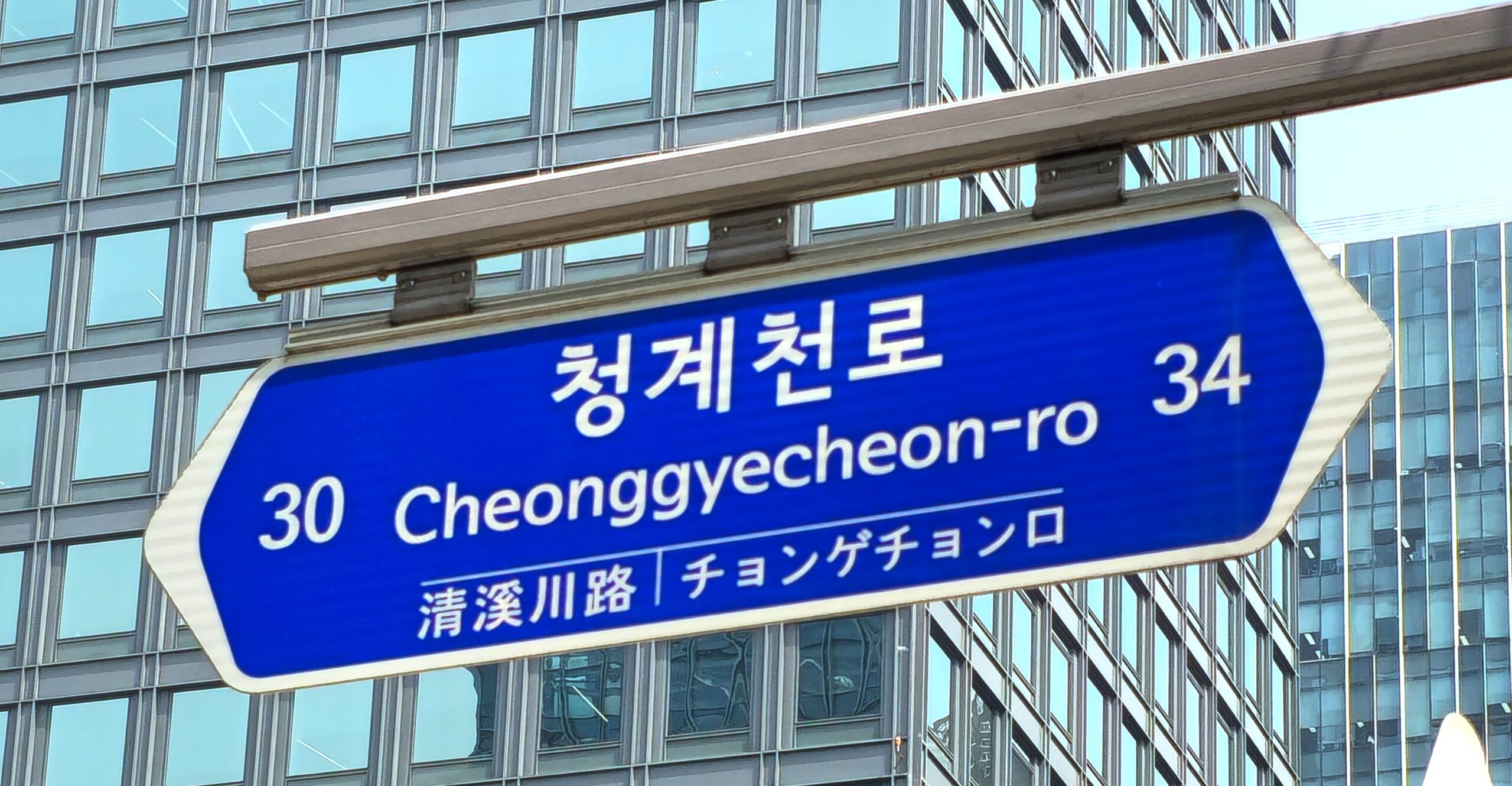
For example, a sign may show 청계천로 / Cheonggyecheon-ro. That identifies the road, not one exact door. A precise search still needs the correct building number and, for a tenant inside a large building, the place or branch name.
When copying an address, preserve spaces and numbers. If the venue gives both a road-name address and a land-lot address, start with the road-name version. Keep the other version as a fallback rather than combining the two into one query.
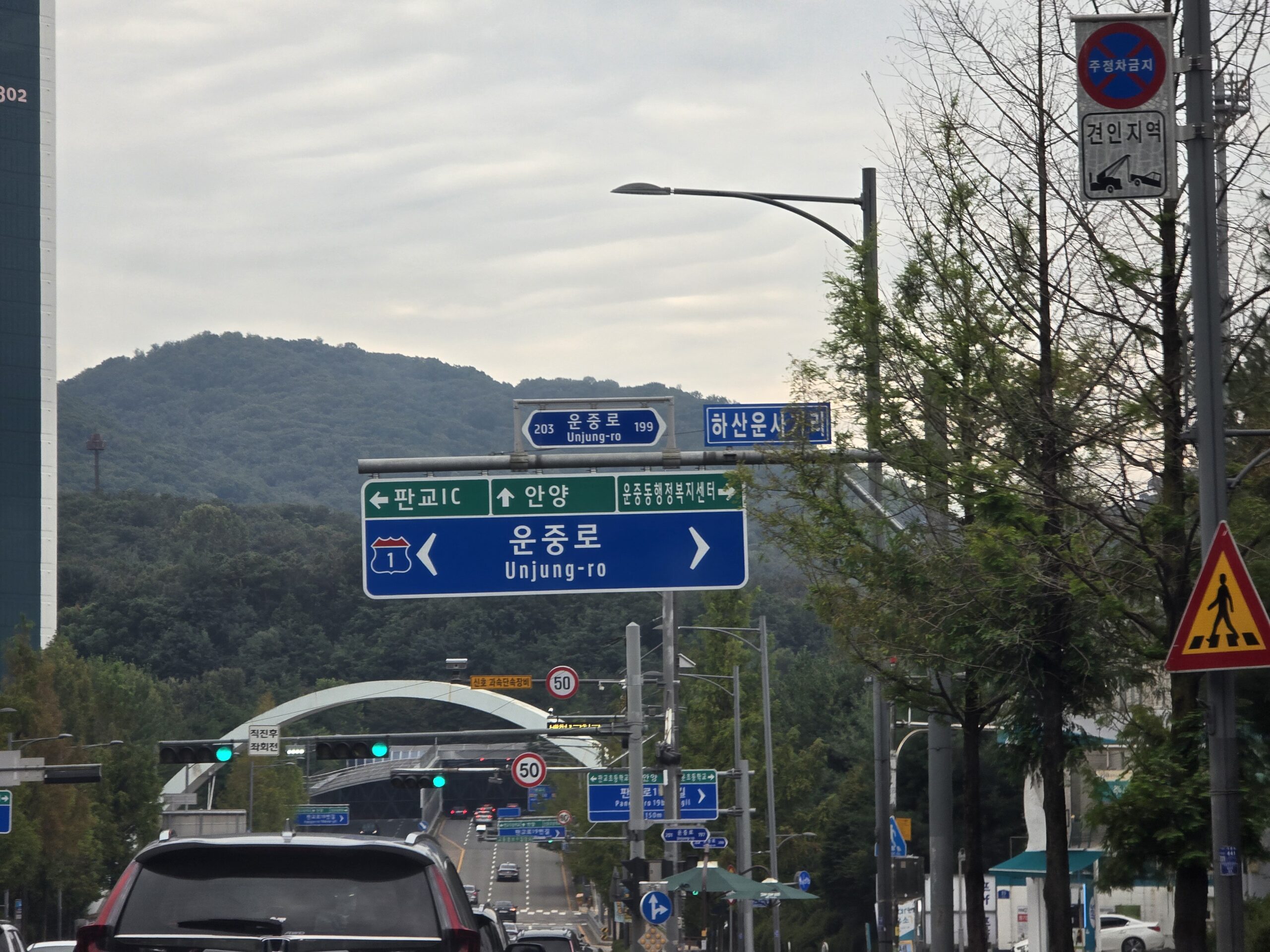
Compare the Korean and Romanized road names on physical signs. In this photo, 운중로 and Unjung-ro name the same road. The nearby arrows point toward other places; they do not identify your hotel or building entrance. Use the Korean road name together with the building number and locality from your booking when checking the map.
Step 2 — Search the exact Korean business name first
Paste the exact Korean name into the NAVER Map search box. Do not translate it yourself and do not add words that are absent from the official listing.
NAVER says business results consider query relevance, usage, and information quality, and that rankings can change. The first result is therefore not proof that you found the correct branch.
If the name is unique, open the result and move to the verification checklist below. If the name is generic or belongs to a chain, continue to Step 3.

Step 3 — Add the address or smallest useful area
NAVER’s search guidance recommends checking an exact business together with its address. For ambiguous results, search one of these combinations:
Korean business name + full Korean road-name address;Korean business name + district (구); orKorean business name + neighborhood (동, 읍, or 면).
NAVER explains that a region plus a business name or category prioritizes results in that administrative area and nearby areas. It also recommends using the smallest administrative area for a business whose name itself contains a regional word.
Do not paste a large block containing booking codes, guest names, dates, and the address. Search only the place name and address needed to identify the destination.
Step 4 — Verify six details before accepting the result
Open the candidate place and compare:
- Korean place name: Is it exactly the venue or branch you were given?
- Road-name address: Do the city or province, district, road, and building number match?
- Branch or building: Is the department-store, station, terminal, hotel, or mall branch correct?
- Category: Does the listing describe the right kind of place?
- Phone number: If the venue publishes one, does it match the official page or booking confirmation?
- Map pin and entrance: Is the pin on the expected block, and is the useful entrance on the same side of the building?
Treat a matching English label as supporting information, not the deciding check. A correct pin for a large station, palace, hospital, mall, or university may still be far from the entrance you need.
Step 5 — Use the visible map area for nearby alternatives
If the exact place is missing but you know the correct neighborhood, move the map to that area. NAVER documents a Search this map area control: after moving the map, use that control to refresh results for the visible area.
This is useful for finding another entrance, branch, station exit, or nearby category. It is not a substitute for verifying the exact address. A nearby result can still be the wrong business.
Step 6 — Use filters for discovery, not identity
NAVER documents filters for restaurant searches, including rating, cuisine, theme, and reservation or order options. Filters can reduce a broad discovery list, but they should not decide whether a particular branch is correct.
For a known destination, exact name and address verification come first. Use filters only when you are choosing among alternatives in an area. Search rank and ratings can change and do not replace checking the venue’s current official information.
Step 7 — Check the official address system when details conflict
NAVER says its road-name results collect data from the Ministry of the Interior and Safety’s road-name-address system. When an address seems wrong, search the official English Road Name Address site or its standard map.
Use this decision rule:
Swipe or scroll to see all columns.
| What you find | Next action |
|---|---|
| Official address and NAVER result match | The problem is more likely the business listing, branch, pin, or entrance. Recheck the official venue source. |
| Official address differs from NAVER | Keep the official address and use NAVER’s address-correction path if appropriate. |
| Business has moved or closed | Confirm directly with the venue; an address database does not prove the business still operates there. |
| Only a land-lot address is available | Try it as a fallback, then compare the returned road-name address and building. |
NAVER warns that if its address result already matches the official road-name-address data, an address correction will not be made. Do not repeatedly submit the same correction without identifying what is actually wrong.
Step 8 — Save a recovery packet before you travel
Store these outside the map app:
- exact Korean place and branch name;
- full Korean road-name address;
- phone number from the official venue source, when available;
- nearest station and exit;
- a privacy-safe screenshot of the place result and pin; and
- the map share link, if available in the current interface.
Do not save only a cropped pin with no Korean text. If mobile data fails, the address is what station, hotel, tourist-information, or taxi staff can verify.


Once the destination is verified, use How to Use NAVER Map in English to build and save the route details.
Worked search pattern
Suppose a booking message gives you a Korean venue name and an address in Jongno-gu.
- Search the exact Korean venue name.
- If several results appear, add
종로구. - If ambiguity remains, paste the full Korean road-name address with the name.
- Open the likely result and compare road, building number, category, phone, and pin.
- If the address conflicts, verify it in the official Juso system.
- Save the Korean name, address, nearest station or exit, and a privacy-safe result screenshot.
This pattern is safer than repeatedly changing English spelling because every new romanization guess can produce a different search intent.
Common failure points
The English name returns nothing
Use the exact Korean name or full Korean road-name address from the venue’s official source. Do not rely on automatic translation or phonetic guesses.
The first result is the wrong branch
Add the district or neighborhood, then compare the full address, category, phone number, and pin. Search order is not a branch guarantee.
The map shows the right building but the wrong entrance
Look for an entrance-specific note on the venue’s official site. Save the nearest station exit and ask staff on arrival. Large complexes can have several valid pins.
The address from a booking does not match NAVER
Check the official Juso system, then contact the venue. A recently moved business can have a valid new address while an old listing remains visible.
Search this map area shows irrelevant places
Narrow the visible map and use a more precise category or Korean name. Return to exact-address search if you already know the destination.
A saved screenshot has no useful text
Retake it with the Korean name, road address, and pin visible. Also save the address as selectable text in Notes.
A result includes reviews or user photos
Do not republish them. Capture only the minimum interface needed to explain your own search and keep third-party user content out of the image.
The app requests login for saving
Keep the address, share link, and screenshot outside the app. The existing NAVER guide explains that in-app saving requires login; this guide does not test account creation.
The current interface does not match this guide
Use the official help links below, then identify the equivalent search, place-detail, or visible-area control. Record the app version when reporting a changed path.
Fallback ladder
- Retry with the exact Korean place name.
- Add the district, neighborhood, or full Korean road-name address.
- Move the map to the expected area and use Search this map area.
- Verify the address in the official Juso system.
- Compare the venue’s official website, booking confirmation, and published phone number.
- Show the saved Korean name and address to station, hotel, venue, tourist-information, or taxi staff.
Korean phrases for address checks
- 이 주소가 맞나요? — Is this the right address?
- 이 지점이 맞나요? — Is this the right branch?
- 입구가 어디예요? — Where is the entrance?
- 이 주소를 지도에서 찾아 주세요. — Please find this address on the map.
Privacy and screenshot rules
Use public attractions, stations, government buildings, or other non-sensitive examples when documenting the workflow. Before saving or publishing a screenshot, remove:
- your live current-location dot;
- home, hotel-room, or private accommodation addresses;
- recent-search history;
- account name, avatar, email, or phone number;
- booking codes, tickets, QR codes, and notifications; and
- user reviews or user-uploaded photos that are not necessary for the instruction.
Do not recreate the interface and label it as a screenshot. If a current real app capture is not available, omit the image and link to the official help page.
Frequently asked questions
Should I search in English or Korean?
Start with the official English name if it is distinctive. If it fails or produces ambiguous branches, use the exact Korean name and full Korean road-name address.
Is the first NAVER result usually the right place?
Do not assume so. NAVER says ranking uses multiple factors and changes over time. Verify the address, branch, category, phone number, and pin.
What is more useful: a road name or a business name?
Use both when possible. The road-name address identifies the building; the business or branch name helps identify the tenant, entrance, or exact destination inside it.
Can I use a romanized address?
Use it for recognition, but keep the Korean original. Korean text reduces ambiguity and is easier for local staff to verify.
Does a correct pin guarantee the correct entrance?
No. Large stations, malls, hospitals, campuses, and attractions can have several entrances. Confirm the entrance or nearest exit separately.
Do I need a NAVER account or Korean phone number?
The official search instructions cited here do not document either as a requirement for searching. This guide did not independently test the current signed-out mobile flow. Saving places and routes is a separate login-required function.
What if NAVER and the official address system match but the place is wrong?
Recheck the business name, branch, phone number, pin, entrance, and whether the business has moved. NAVER says it will not change an address result that already matches the official road-name data.
Official sources
| Source | What it supports |
|---|---|
| NAVER Map product page | Official map, place search, directions, discovery, and saving context |
| NAVER address search help | Road-name data source and correction boundary |
| NAVER business-result ranking help | Ranking factors, changeable order, and name-plus-address search |
| NAVER nearby-result help | Region-aware search and smallest administrative-area advice |
| NAVER Search this map area help | Refreshing results for the visible map area |
| NAVER search-filter help | Restaurant and place filtering boundaries |
| NAVER origin and destination help | Selecting a place or point for route endpoints |
| Korean Road Name Address search | Official English address lookup |
| Korean Road Name Address standard map | Official address map cross-check |
| Korean Road Name Address guide | Road name, building number, and English notation structure |
Change log
- 2026-09-17 — Reclassified stable navigation/address guidance to the 90-day Amber review cycle; last verification date unchanged.
- 2026-09-17 — Rechecked NAVER search, address-data, ranking, area, filters and route-endpoint help. Replaced obsolete Juso URLs after opening the redesigned official English search, map, guidebook entry and current Korean address/romanization guidance. Existing dated Android images are preserved; no current app, route, address correction or venue was tested.
- 2026-09-16 — Added practical photo examples and screen-reading instructions. The Guide-wide verification date and transaction-test status are unchanged.
- 2026-09-10 — Aligned the quick answer and added a dated, scoped official-source check. The full-guide verification date and field-test status are unchanged.
- 2026-09-09 — Clarified the opening instructions and related information; retained existing images, sources and the Guide-wide verification date.
- 2026-08-13 — Initial official-source draft. Checked NAVER's address data source, result-ranking guidance, smallest-area search advice, Search this map area control, filters, and route endpoint help against current official pages. Checked Korea's official English Road Name Address tools and address structure. Added two real road-sign photographs with commercial-use-compatible licenses. No account, route, address-correction, or signed-out flow was independently tested; no AI-generated UI or recreated interface was used.
- 2026-08-13 — Added two author-owned actual NAVER Map Android result-list screenshots showing an exact Korean-name search and branch/address comparison. The app version was not recorded, so no version-specific behavior is claimed. A third real capture containing NAVER map tiles remains research-only pending commercial online reuse permission.
Official-source checked Checked
The listed official sources were checked for this version of the guide.
Official sources rechecked · September 17, 2026
Rechecked NAVER search, address-data, ranking, area, filters and route-endpoint help. Replaced obsolete Juso URLs after opening the redesigned official English search, map, guidebook entry and current Korean address/romanization guidance. Existing dated Android images are preserved; no current app, route, address correction or venue was tested.
- Next review
- Change rate
- Reviewed every 90 days
- Sources checked
- 11