Start with the practical guide
This page describes the service and its limits. For the travel task, use the linked step-by-step guide. Open the travel guide.
What Kakao T is for
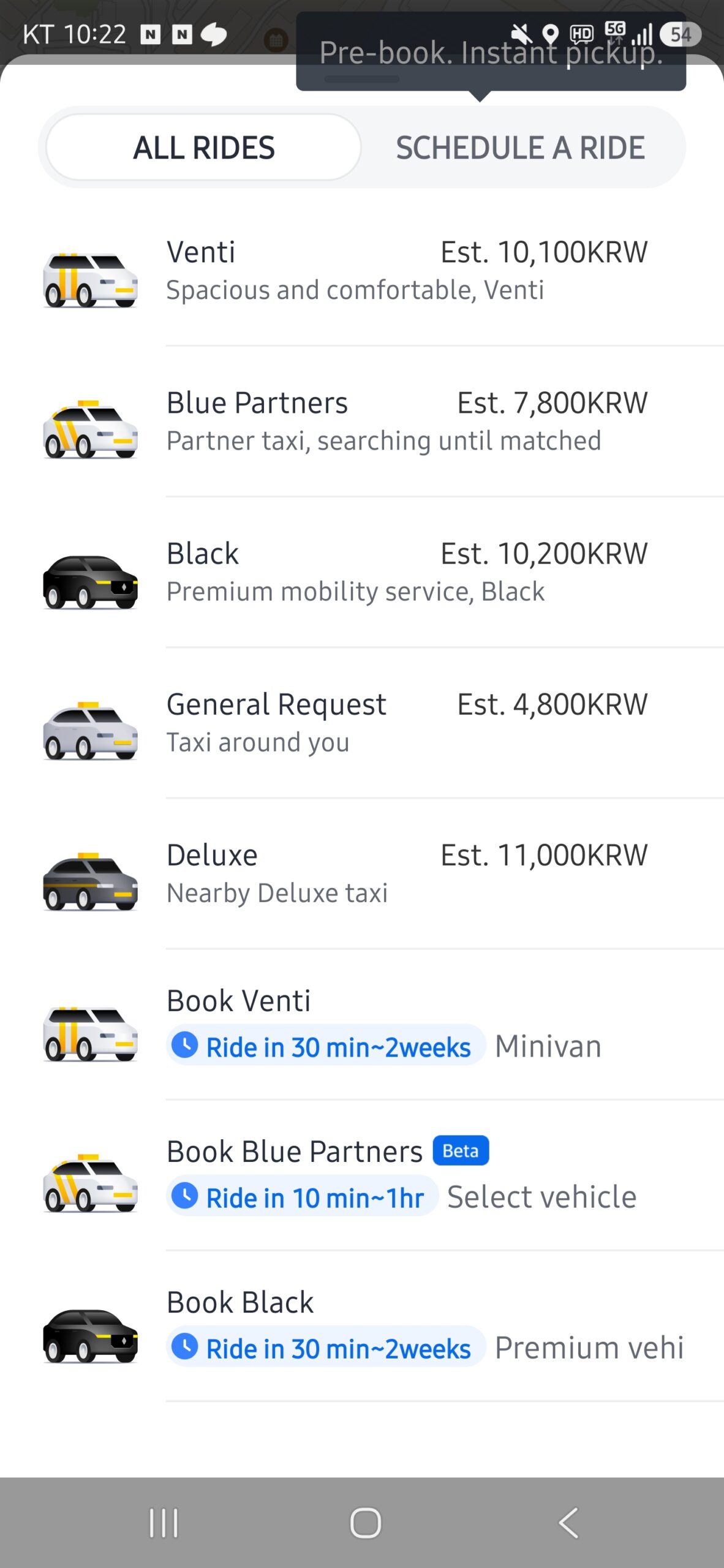
Kakao T is Kakao Mobility’s domestic all-in-one mobility app. Its current official pages document taxi requests anywhere in Korea, GPS-based vehicle tracking, several taxi types, advance reservations, and a wider set of transport, vehicle, delivery, and travel services.
For a visitor, the narrowest useful job is requesting a taxi after the account, pickup, destination, and payment route are already confirmed. Do not install it at a late-night curb and assume that an overseas phone number, foreign card, preferred language, or immediate driver will work.
Compatibility summary
The current English Kakao T Terms say that sign-up uses a valid Kakao Account. They also say an application may be rejected when required real-name verification or self-authentication was not completed. The checked official sources do not define a universal visitor-only signup path or confirm which foreign country codes can complete the live flow.
Foreign-phone support, Korean-phone requirement, identity-verification boundary, and overseas-card support therefore remain unknown in this record. A passport is not listed as a general Kakao T signup requirement in the checked sources, but that does not remove any account verification the current app may request.
Set up the account before relying on it
Install the official app, switch to a supported language, sign in or create the required Kakao Account, and complete only the verification shown by the current app. The iPhone listing currently documents English, Japanese, and Korean. Language support does not guarantee that driver calls, addresses, notices, support, or payment errors will all be translated.
Complete setup on trusted internet before the trip needs a taxi. Stop if the live flow rejects the country code, requires verification you cannot complete, or does not provide a recoverable account route. Keep the Korean destination, phone number when available, and a privacy-safe map screenshot outside Kakao T.
Request and verify the taxi
Set the pickup pin on the correct road side and entrance, then confirm the exact destination and vehicle type. Before dispatch, read the estimated fare, payment route, cancellation conditions, reservation or premium charge, and pickup instructions shown on the live screen. A marketing page does not guarantee that every taxi type is available at every location or time.
After matching, compare the vehicle plate and type with the app and watch the live approach. Driver supply, acceptance, cancellation, traffic, weather, and inaccessible pickup points can still break the plan. Move only to a safe, legal pickup point and do not share more personal information than the ride requires.
Pay only through a confirmed route
Kakao T’s Terms allow either Auto-Pay through the app or direct on-site payment according to each service’s policy. They do not promise that every overseas-issued card will register or authorize. Confirm the payment method on the final request screen instead of treating a saved card, card logo, or earlier ride as proof.
If an accepted on-site-payment option is displayed for the selected taxi, prepare a separate working payment method and ask for the receipt. If the app requires Auto-Pay and no available method authorizes, do not dispatch and hope to change payment later. Review cancellation charges before retrying another vehicle type or app.
When k.ride or a taxi stand is safer
Kakao Mobility separately describes k.ride as a platform for foreign visitors, with Google, Apple, or email signup, overseas-issued cards and supported wallets, and English, Japanese, and Chinese interfaces. That makes k.ride the clearer official route when Kakao Account or payment compatibility is the blocker. It is a separate app, so its claims must not be transferred to Kakao T.
Keep an independent fallback: at Incheon Airport use the designated official taxi stand; elsewhere ask an official hotel, station, venue, or tourist-information desk for the current staffed route. Save the Korean destination in KakaoMap and never make a time-critical trip depend on one app, one account, one card, or one driver match.
Official-source review · 2026-10-29
Rechecked Kakao Account and authentication requirements, taxi categories and the terms distinguishing Auto-Pay from on-site payment where a service permits it. These terms do not guarantee every overseas number or card. k.ride remains a separate visitor-oriented alternative with its own automatic-payment requirement.
policy.kakaomobility.com · www.kakaomobility.com · play.google.com · www.kakaomobility.com
Official documents were reviewed. No purchase, payment, booking, journey, app onboarding or physical-device test was performed.