Official-source checked
The short answer
Install and test NAVER Map for local routes, Papago for translation, and Emergency Ready App for disaster information. Keep KakaoMap as an account-independent search-and-directions fallback. Add k.ride only if you expect to call taxis, and use KORAIL’s English mobile website rather than assuming the Korail+ app works without a Korean number.
You do not need a Korean phone number for maps, basic web translation, official emergency information, or KORAIL’s English web booking. Taxi apps are different: k.ride offers mobile-number, email or supported social-account registration; complete the verification required by the route you choose. Any undocumented signup or country-code boundary remains Unknown — recheck in app.
- Korean phone number
- Not required
- Foreign-issued card
- Partially supported
- Korean ID
- Not required
- English support
- Partial English
In this guide

Korea Tourist App Access Matrix
Use this matrix as a pre-departure access check. “No Korean phone required” applies only to the basic task described; verify country codes, signup, payment, and offline behavior in the current app.
Swipe or scroll to see all columns.
| Task | First choice | Korean phone boundary | Account or payment boundary | Independent fallback |
|---|---|---|---|---|
| Search places and plan local routes | NAVER Map | A Korean phone requirement is not documented for core search and routes; signed-out app behavior was not field-tested. | Saving requires login; payment is not part of the core map task. | Use account-independent KakaoMap search and directions, and save the Korean address and route screenshots. |
| Translate Korean | Papago | Basic signed-out web text translation is documented; the app phone-number boundary must be rechecked. | Login boundaries for saved or advanced features may differ; payment is not part of the core translation task. | Download and test the offline language pair, then save essential phrases because the official offline help pages conflict. |
| Receive disaster information | Emergency Ready App | The onboarding phone-number boundary was not field-tested. | No payment is needed for the safety-information task; review current permissions even though the checked store disclosure reported no collected data. | Use the multilingual National Safety 24 website and call 112 or 119 in an emergency. |
| Call and pay for a taxi | k.ride | Current terms allow a mobile number, email or supported social account. Test the route offered on your device. | Email, Google or Apple signup is documented; phone entry is not a universal first step. Overseas-card payment is documented, but test the current card flow before relying on it. | Use a designated taxi stand or ask official staff to help you reach one. |
| Find official travel information | VISITKOREA | A Korean phone is not listed for membership; guest-mode app behavior must be rechecked. | Email and social-account membership are documented; payment is not part of the information task. | Use the VISITKOREA website and the 1330 web chat or online call. |
| Book intercity rail | KORAIL English mobile website; Korail+ is optional | The checked nonmember web retrieval path does not depend on a Korean phone number. | The nonmember path uses email and a numeric password; foreign-card payment may require 3-D Secure. | Use a staffed KORAIL station counter. |
| Keep a backup map | KakaoMap | The operator states that core map search and directions are account-independent. | No account or payment is needed for the core search-and-directions task. | Save the Korean address and ask staffed transport or visitor-information personnel for help. |
This is a minimum, not a universal list. Add a rail, restaurant, payment, or attraction app only when your itinerary actually requires it and after checking its current signup and payment conditions.
What “without a Korean phone number” means here
This guide means that the basic setup does not depend on owning a Korean mobile number before departure. It does not mean:
- Every app works without any phone number at all.
- Every optional feature works while signed out.
- Every foreign phone number or country code is accepted.
- SMS verification will always arrive while roaming.
- Every overseas-issued card will pass an in-app payment check.
k.ride is the clearest example. Current k.ride terms allow registration using a valid mobile number, email or major social account. The operator documents Google, Apple and email signup; a Korean phone number is not stated as a universal requirement. Treat your exact country code and verification delivery as a pre-departure test, not a guarantee.
What to have ready
- A supported iPhone or Android phone with enough storage
- Your normal app-store account and password
- A stable internet connection for installation and offline downloads
- Your foreign mobile number with the correct international country code
- Access to the email, Google, or Apple account you may use for verification
- One overseas-issued card plus a second payment backup if you plan to use k.ride
- Your accommodation name and full address in English and Korean
- The Korean names of the airport, stations, attractions, and restaurants you expect to use
- A notes app or offline document for addresses, routes, phrases, and emergency information
- Time to test each essential action before departure
Step 1 — Install only from verified listings
Start from the Korea Tourism Organization’s Helpful Apps & Resources page, the operator’s official website, or a store listing that shows the correct developer.
Check the developer before installing. These are the verified store listings for the three essential apps:
Swipe or scroll to see all columns.
| App | Developer to confirm | iOS | Android |
|---|---|---|---|
| NAVER Map | NAVER Corp. | Apple App Store | Google Play |
| Papago | NAVER Corp. | Apple App Store | Google Play |
| Emergency Ready App | Ministry of the Interior and Safety of Korea / 행정안전부 | Apple App Store | Google Play |
For optional apps, confirm Kakao Mobility for k.ride and Korea Tourism Organization for VISITKOREA.
Avoid a similarly named app, a third-party download site, or a link sent by an unknown account. Do not enter passport, card, or verification information until the developer and domain match the official source.
Step 2 — Set up NAVER Map without making signup the first task
NAVER’s current store listing documents Korean, English, Japanese, and Chinese maps, English navigation, public-transport directions, real-time arrival information, and route planning. Those are the functions to test first.
- Open NAVER Map and change the app language to English if it did not follow the phone language.
- Search for your accommodation using both its English name and Korean address.
- Build one route from your arrival point to the accommodation.
- Build one walking route from the nearest station or bus stop to the entrance.
- Save screenshots showing the Korean destination name, final stop, exit, and last walking section.
- If the app asks you to sign in for bookmarks, reviews, booking, or syncing, decide whether that feature is actually necessary.
NAVER states that saving places and routes requires login. It also announced foreign-passport identity verification for eligible foreign users in 2026, but this guide did not test that flow or treat it as a guarantee for every linked booking, order, or payment provider. Treat account creation and foreign-number acceptance as Unknown — recheck in app. If signed-out routing or an English search result fails, try KakaoMap, whose operator states that map search and directions are account-independent. A screenshot and written Korean address are safer than depending on a new account at the airport.
Step 3 — Prepare Papago for an offline moment
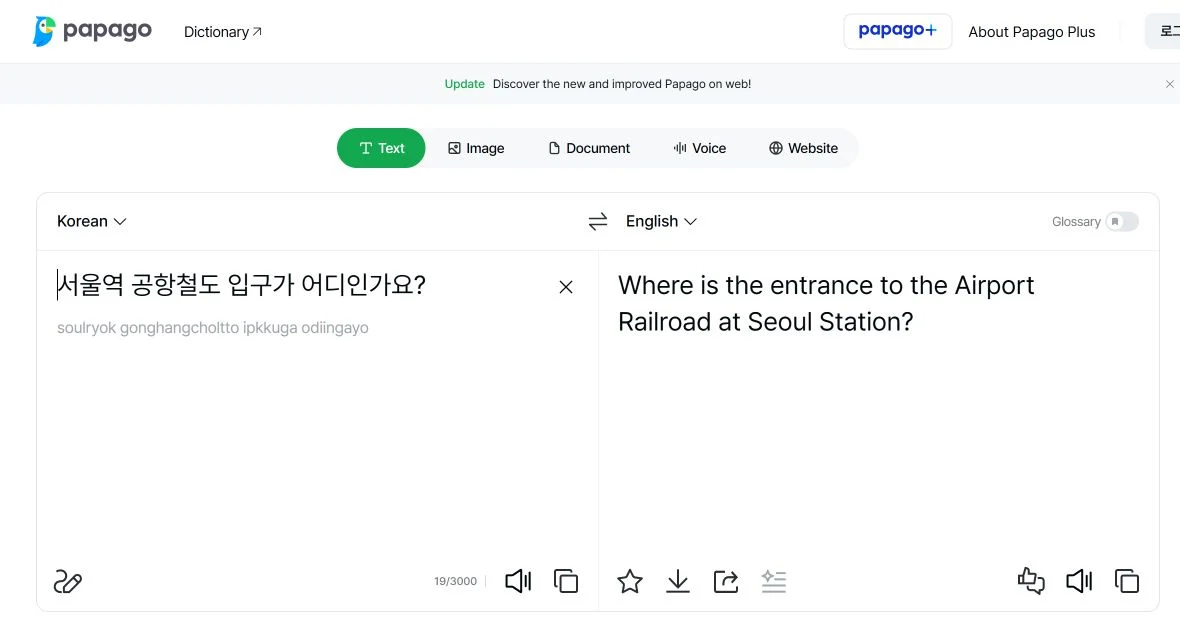
Papago’s official help states that a non-logged-in web user can perform basic text translation, with a lower per-translation character limit than a logged-in user. Its current app listing includes text, image, voice, conversation, and offline translation.
Before departure:
- Set the language pair you need, such as English ↔ Korean.
- Translate one short sentence while signed out.
- Download the offered offline language file while on Wi-Fi.
- Turn off mobile data temporarily and test the exact offline language pair yourself.
- Save a few essential phrases in a separate offline note.
NAVER’s current Korean offline help documents downloaded text and voice translation among Korean, English, Japanese and Simplified Chinese. Text translation requires at least 4 GB RAM; Android voice translation also requires Android 14 or later and an additional voice language pack. iOS text and voice translation require at least 4 GB RAM. The iPhone release history added offline voice translation on September 1, 2026. A separate English network-help page still says translation needs a connection, so test the exact supported language pair and feature on your device before departure. Traditional Chinese is not listed among the offline languages. Keep saved phrases as a fallback. Offline voice translation is now documented subject to device and language-pack requirements. Conversation, image, website and document translation remain unavailable offline; handwriting, pronunciation playback, dictionary information and several advanced features are also excluded by the current help page.
Useful phrases to save:
이 주소로 가 주세요.— Please take me to this address.영어로 도와주실 수 있나요?— Could you help me in English?인터넷이 안 돼요.— My internet is not working.이 번호로 문자가 안 와요.— The text message is not arriving at this number.
Step 4 — Configure Emergency Ready App before you need it
The Ministry of the Interior and Safety states that Emergency Ready App provides multilingual disaster messages, safety guidance, and shelter information. Its September 8, 2026 Android listing also describes searches for emergency medical centers, fire stations, and police stations, plus a direct 119 call function.
- Confirm that the developer is the Ministry of the Interior and Safety of Korea.
- Select your language.
- Choose the region or regions where you will stay.
- Review notification and location permissions instead of accepting every permission automatically.
- Open the shelter and safety-guide sections once so you know where they are.
- Save 112 for police and 119 for fire, ambulance, and rescue separately from the app.
Current government store disclosures say the app collects no data, and the official setup material focuses on language, region, location, and notifications rather than membership. We still did not complete onboarding, so if an account or phone prompt appears, treat it as Unknown — recheck in app and use the official multilingual web service as the fallback.
Keep the emergency numbers and travel-help contacts outside the app as well, so a failed login or connection does not hide the number you need.
Step 5 — Set up k.ride only if taxi calling is part of your plan
k.ride is Kakao Mobility’s service for international visitors. The operator documents multilingual destination search and chat, overseas-issued card payment, and registration through a mobile number, email or supported social account, with Google and Apple routes documented.
Before relying on it:
- Choose the mobile-number, email or supported social-account route offered by the current app. Use the correct country code if choosing a phone number.
- Complete the selected verification route; confirm country-code acceptance and SMS delivery if using a phone number.
- Complete only the official email, Google, or Apple verification path shown in the app.
- Add a supported overseas-issued card if you intend to pay in the app.
- Search for one real destination and confirm that the pin matches the Korean address.
- Review the displayed fare type, cancellation terms, and payment method before any live request.
- Keep a designated taxi stand as the independent fallback.
Do not make a live taxi request merely to test the app. This guide did not verify SMS delivery, a specific country code, a card authorization, a dispatch, a final fare, or cancellation handling.
Step 6 — Add VISITKOREA only when its official tools help your trip
VISITKOREA is the Korea Tourism Organization’s official travel platform. It provides destination information, current events, travel planning, and links to 1330 traveler help. Its membership page documents signup through email, Google, Apple, Facebook, X, or LINE.
Use the app or website for official travel information. Do not assume that app guest mode, saved plans, coupons, or every personalized feature has the same login boundary; recheck in app. If you only need information or help, the official website may be enough.
Optional apps should follow the itinerary
Install these only if needed:
- Korail+: the former KorailTalk app was renamed Korail+ in August 2026. KTO identifies it as an official KORAIL platform, but the current app phone-number and nonmember boundaries are not clear enough to guarantee. Prefer the KORAIL English mobile reservation page, whose ticket-retrieval path uses email and a numeric password, or use a station counter. An overseas card must support 3-D Secure for the official online path.
- Restaurant or delivery apps: wait for a restaurant-specific guide. Phone verification, region, payment, and inventory conditions differ by service.
- Payment or transport-card apps: do not assume that an overseas card, phone model, NFC setting, or identity method is supported. Keep a physical card or cash-based route where appropriate.
More apps create more failure points. A tested small stack is better than a folder of unverified downloads.
Check the task beyond the login screen
An app opening successfully does not show that you can complete a booking. Before relying on it, find the exact branch or route, check the offered guest or Global flow, and see which phone-number and payment fields are required. Stop before any paid confirmation unless you intend to buy.
Keep the Korean destination address outside the app. If a number or checkout blocks you, use the phone-number decision guide or the online-payment recovery steps to identify which stage needs a different route.
The 15-minute pre-departure test
Complete every item that applies:
- NAVER Map finds the Korean address of my accommodation.
- I can open a route from my arrival point to that address.
- I saved the final stop, exit, and walking section offline.
- Papago translates one short sentence while signed out.
- The offered Papago offline language pair is downloaded and tested; I also saved plain-text phrases because official offline guidance conflicts.
- Emergency Ready App opens in a language I understand.
- I selected the relevant alert region and reviewed notification settings.
- I saved 112, 119, and the 1330 web-help route outside the apps.
- If I need taxis, k.ride completes my selected registration and verification route; I tested my country code if using a phone number.
- If I need in-app taxi payment, my payment method is added and I still have a backup.
- My phone has enough battery, storage, and a charging plan.
If any required item fails, solve it before departure or write down the independent fallback.
Common reasons this does not work
Swipe or scroll to see all columns.
| Symptom | Likely cause | Safest next action |
|---|---|---|
| You installed the wrong app | A lookalike name or third-party download link was used | Delete it, return to the official operator or KTO page, and confirm the developer before reinstalling. |
| NAVER Map cannot find an English place name | The English spelling differs or the listing is indexed under Korean | Paste the Korean road address, search the phone number, or use a saved map pin and ask the accommodation to confirm it. |
| An app suddenly asks for login or verification | The selected feature is account-only or the onboarding flow changed | Stop and decide whether the feature is necessary. Use the signed-out or web fallback and label the requirement for rechecking. |
| A verification message does not arrive | Country-code support, number format, roaming, filtering, or delivery is failing | Check the country code and number once, use the documented email or social path when offered, and do not make repeated rapid attempts. |
| Papago does not translate offline | The selected language pair or feature is not available offline, or the current app follows the conflicting network-required guidance | Stop assuming offline translation is available; use saved phrases and reconnect through Papago web. |
| Emergency alerts are missing | The region, language, notification, battery, or background-data setting is wrong | Recheck settings and use the official multilingual National Safety 24 website; do not depend on one alert channel. |
| k.ride rejects a card | The issuer, authentication, card network, or current payment rule blocks it | Try one different supported card, then use a designated taxi stand and another payment method. |
| The taxi pin is wrong | The English place result points to another branch or entrance | Compare the Korean address and map pin before requesting; cancel before dispatch if the destination is wrong. |
If an app still fails
Use this fallback order:
- Retry the core task once using the exact Korean address, correct country code, or plain text.
- Switch from the app to the operator’s official website: KakaoMap web, Papago web, or KORAIL’s English mobile reservation page, as relevant.
- Use your saved offline address, route screenshots, phrases, and emergency numbers.
- Ask an official airport, station, hotel, tourist-information, or transport counter for help.
- Use the 1330 Korea Travel Helpline web chat or online call from the official VISITKOREA site.
- For an immediate emergency, call 112 or 119 instead of troubleshooting an app.
Privacy and permission check
Grant only what the feature needs:
- Map directions need location, but reviews and receipt uploads may request additional access.
- Papago microphone, camera, photos, and speech-recognition permissions relate to voice or image features; plain text needs less access.
- Emergency alerts may need notifications, location, or a selected region.
- A taxi app needs location and payment information for a live request.
Review the current permission prompt on your device. This guide does not treat a store privacy label as proof that every future app version will behave the same way.
Frequently asked questions
Do I need a Korean phone number for this minimum setup?
No Korean number is part of the minimum path described here. For k.ride, use the mobile-number, email or social route offered by the current app; official material does not guarantee every country code or verification attempt. Account-only features in other apps can also introduce new requirements. Test your exact path before departure.
Can I use NAVER Map without a NAVER account?
NAVER documents map and routing functions, and says that saving places or routes requires login. Its help also recognizes a separate non-logged-in map-search history and non-logged-in Discover content, but those pages are not a complete guest-mode matrix and do not guarantee every current search or routing flow while signed out. Try the exact route task before creating an account. If it fails, use account-independent KakaoMap search or directions and keep screenshots and the Korean address.
Can I use Papago without logging in?
Yes for basic web text translation according to NAVER’s current help, with a lower character limit than the logged-in service. App-only and advanced features can have different requirements. Offline behavior must be tested because NAVER’s official help pages conflict.
Is k.ride guaranteed to accept my foreign number and card?
No. Kakao Mobility documents mobile-number, email or supported social registration and overseas-card support, but that is not a guarantee for every country code, issuer, card, or authentication attempt. Recheck in app and keep a taxi-stand fallback.
Do I need a Korean phone number to book a KORAIL train?
The clearest official no-Korean-number route is KORAIL’s English mobile website. Its reservation and My Ticket pages use trip details, email and a numeric password rather than a Korean-number field. An overseas card must support 3-D Secure. The Korail+ app’s current phone-number and nonmember boundaries remain Unknown — recheck in app.
Is Emergency Ready App a replacement for 112 or 119?
No. It is an information and alert tool. For an immediate emergency, call 112 for police or 119 for fire, ambulance, and rescue.
Should I install every app recommended by a travel article?
No. Install only the apps needed for your itinerary, verify the developer, test the critical action, and keep an independent offline or in-person fallback.
Official sources
Rechecked on October 29, 2026.
| Institution or operator | Official page | What it was used to verify |
|---|---|---|
| Korea Tourism Organization | Helpful Apps & Resources | Current official travel-app overview, languages, k.ride signup routes, overseas-card support, Emergency Ready scope, VISITKOREA, and Korail+ positioning |
| NAVER Corp. | NAVER Map product page | Place discovery, saving, and route functions |
| NAVER Corp. via Google Play | NAVER Maps, Navigation | Current developer, supported map languages, English navigation, routing functions, and device requirements |
| NAVER Corp. via Apple App Store | NAVER Maps, Navigation | Current iOS listing and the passport-authenticated signup release note; the flow itself was not tested |
| NAVER Corp. | Saving places and routes, signed-out map-search history, signed-out Discover content, and foreign-passport verification announcement | Saving requires login; separate signed-out map-search history and Discover content exist, but these pages do not provide a complete guest-mode matrix; the passport-verification claim is limited and was not tested |
| Kakao Corp. | KakaoMap account boundary and KakaoMap service | Account-independent map search and directions, account-bound personal features, and official service identity |
| NAVER Papago Help | Text Translation | Basic translation availability while not logged in |
| NAVER Papago Help | Offline Translation and Network Connection | Conflicting official offline guidance and the reason this guide requires an in-app test plus saved phrases |
| NAVER Corp. via official app stores | Papago for iOS and Papago for Android | Current official store listings and developer identity |
| Kakao Mobility | k.ride service and operator announcement | International-visitor service, multilingual use, email or social signup, and overseas-card payment |
| Ministry of the Interior and Safety | Emergency Ready App announcement and July 2026 multilingual-service update | Government ownership, multilingual disaster alerts, safety guidance, and shelter information |
| Ministry of the Interior and Safety via official app stores | Emergency Ready App for iOS and Emergency Ready App for Android | Current official listings and developer identity; the Android listing also documents facility and safety functions, update date, and no-data-collected disclosure |
| Ministry of the Interior and Safety | National Safety 24 | Official web fallback for multilingual disaster and safety information |
| Korea Tourism Organization | VISITKOREA Mobile App and Login / Sign up | Official app scope and email or social membership routes |
| Korea Railroad Corporation | English reservation, My Ticket, and overseas-card notice | No-Korean-number mobile-web path, ticket retrieval fields, and 3-D Secure requirement for overseas cards |
| Korea Tourism Organization | 1330 Korea Travel Helpline | Domestic and international numbers, online call, and no-download chat fallback |
Change log
- 2026-10-29 — Rechecked the map, translation, emergency, taxi and official rail access paths. Papago’s specific offline guide documents supported languages and device limits; k.ride requires automatic payment; KORAIL’s English retrieval screen still uses email and a 6–13 digit password. App signup, live dispatch and card approval remain untested. Official documents were reviewed. No purchase, payment, booking, journey, app onboarding or physical-device test was performed.
- 2026-09-17 — Added contextual links to the next relevant help guide.
- 2026-09-17 — Rechecked NAVER/Kakao/Papago/k.ride operator help, terms and stores; KTO app and membership pages; MOIS safety guidance and stores; and KORAIL public reservation/My Ticket screens. Corrected signup and ticket-retrieval wording. No app installation, account, SMS, offline pack, payment, ride, booking or emergency connection was tested.
- 2026-09-17 — Corrected Papago offline voice/language/device conditions and k.ride registration routes against current operator help and terms. This is a partial correction, not a full guide revalidation; the original review deadline is retained. No app or payment flow was tested.
- 2026-09-16 — Added focused recovery steps and clarified traveler conditions; corrected the Galaxy image description and the police lost-property route where applicable. Sources for the amendments were checked today. The Guide-wide verification date and field-test status are unchanged.
- 2026-09-10 — Aligned the quick answer and added a dated, scoped official-source check. The full-guide verification date and field-test status are unchanged.
- 2026-09-10 — Added contextual photographs and instructional screenshots with source and privacy notes. This media update does not change the information-verification date or field-test status.
- 2026-08-11 — Initial official-source check completed for the minimum app stack, NAVER Map and KakaoMap account boundaries, Papago's conflicting offline guidance, k.ride signup and overseas-card claims, the KORAIL English mobile-web path, VISITKOREA membership routes, and the 2026 Emergency Ready service. No app, account, payment, taxi request, or device was independently tested; undocumented signup, country-code, and app phone-number boundaries remain marked for in-app rechecking.
- 2026-08-14 — Added the Kakao T Service relationship to distinguish its Kakao Account and unconfirmed foreign-number and overseas-card boundaries from the Guide's foreigner-focused k.ride route. No app, account, phone, card, taxi request, or ride was independently retested.
- 2026-08-14 — Added the published k.ride Service record with its current no-Korean-phone, overseas-card Auto-Pay, four-interface-language, 133-language translation, and live country-code recheck boundaries. No app, account, phone, card, wallet, taxi request, or ride was independently retested.
- 2026-08-14 — Added the published Papago Service record with its signed-out 3,000-character web limit, 14 core app languages plus conditional English pairings, current device requirements, privacy cautions, and unresolved offline-translation conflict. No translation, app, account, download, offline, or field flow was independently tested.
Official-source checked Checked
The listed official sources were checked for this version of the guide.
Official-source review · 2026-10-29
Rechecked the map, translation, emergency, taxi and official rail access paths. Papago’s specific offline guide documents supported languages and device limits; k.ride requires automatic payment; KORAIL’s English retrieval screen still uses email and a 6–13 digit password. App signup, live dispatch and card approval remain untested.
english.visitkorea.or.kr · help.naver.com · help.naver.com · kakaomap.tistory.com · kride.kakaomobility.com
Official documents were reviewed. No purchase, payment, booking, journey, app onboarding or physical-device test was performed.
- Next review
- Change rate
- Reviewed every 30 days
- Sources checked
- 32