Official-source checked
The short answer
Let the terminal reset and allow one clean retry after checking the amount, currency, card orientation, and requested insert, tap, signature, or PIN method. If it fails again, do not keep forcing the transaction.
Use a separately stored backup card, Korean-won cash, or the correct transport or booking channel. Check the issuer app for a travel block, fraud alert, authentication request, available balance, or account restriction. If unrelated merchants also decline the card, contact the issuing bank through the official number on its app, website, or the back of the card. Visa and Mastercard both direct cardholders to the issuer for the specific decline reason.
A card-network logo shows a possible acceptance path, not guaranteed approval. The issuer, merchant category, terminal connection, payment method, authentication, account settings, and transaction type all affect the result.
For planning rather than live recovery, read Can You Use Foreign Credit Cards in Korea?. For cash access, use the ATM Guide and the cash-reserve Guide.
- Korean phone number
- Not required
- Foreign-issued card
- Partially supported
- Korean ID
- Not required
- English support
- Partial English
In this guide

First identify where it failed
Swipe or scroll to see all columns.
| Failure location | Common boundary to check | First safe fallback |
|---|---|---|
| Staffed shop or restaurant | Card, terminal, network, issuer, amount, or merchant rule | One retry, then another card or KRW cash |
| Unattended machine | That machine may support narrower cards or require a different ticket medium | Use a staffed official counter or another clearly supported machine |
| Subway gate or city bus reader | A foreign bank card is not the normal standard fare medium | Use Tmoney, another supported transit product, or the correct ticket |
| Korean website or app | Domestic phone, card, identity, address, or authentication rules may apply | Use the operator’s official global or foreigner channel |
| Global ATM | Machine network, issuer setting, account type, PIN, fee, or limit may differ | Stop repeated attempts, change official ATM, then ask the issuer |
Do not diagnose an online checkout from an offline card rule. A card can work at a restaurant and fail on a Korean website, or work at a hotel and fail at a transport gate, without contradiction.
Merchant-terminal recovery
At a staffed merchant, keep the sequence simple:
- Verify the displayed amount and that the purchase is legitimate.
- Ask whether the terminal wants insertion rather than contactless tap.
- Let the failed transaction fully cancel before retrying.
- Allow one clean retry without changing several variables at once.
- If it fails, switch to the backup card or KRW cash.
- Check the issuer app before trying again elsewhere.
- Keep any receipt and check for duplicate pending authorizations.
Do not hand the card or unlocked phone to an unknown helper. At a normal staffed counter, keep the card in sight and enter the PIN yourself.
Transport is a separate payment system
A standard subway gate or city-bus reader normally expects a supported transportation card or ticket, not an arbitrary foreign-issued bank card. The failure may be the wrong payment medium rather than a bank decline.
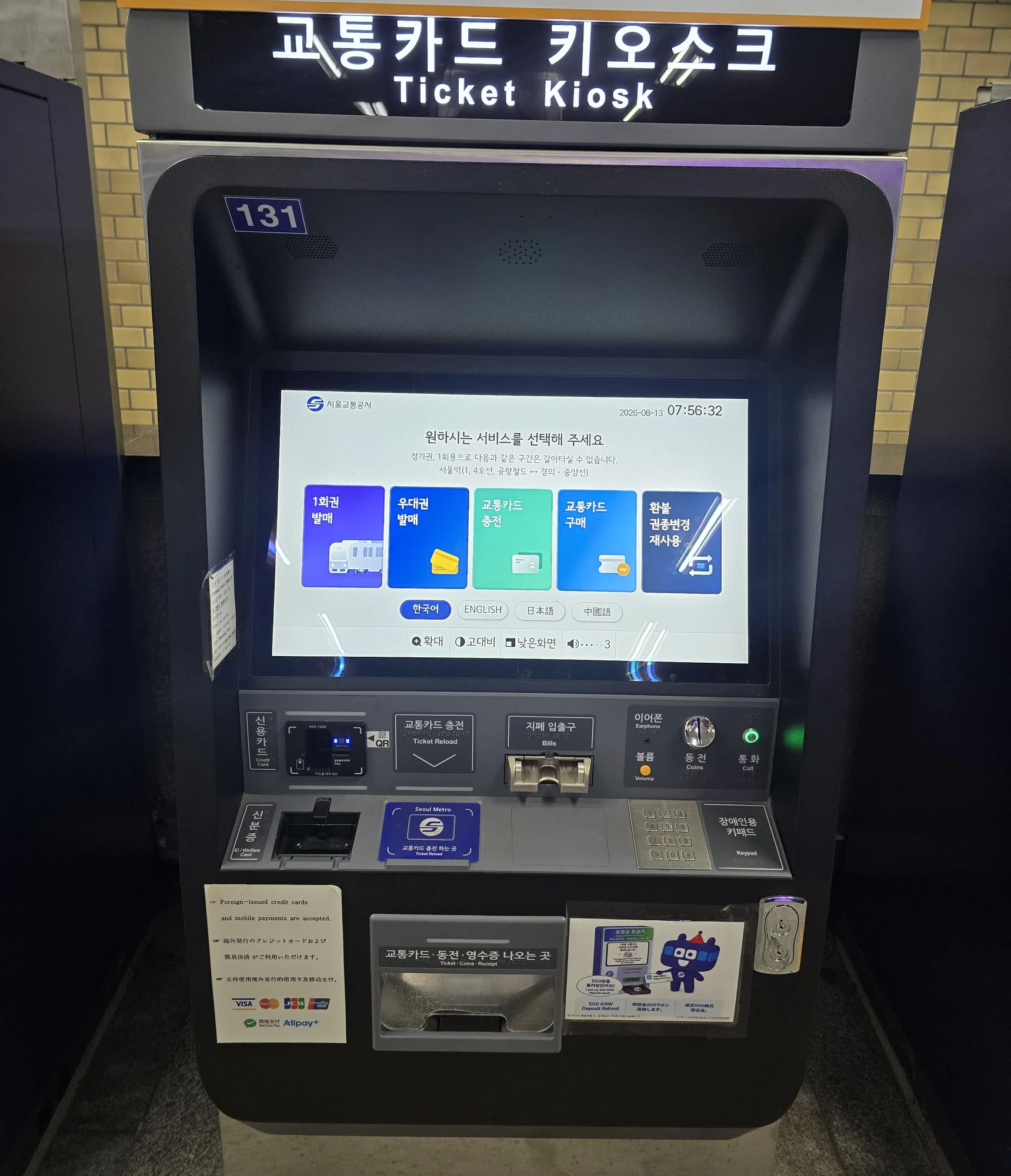
Use the Incheon Airport Tmoney Guide and the Tmoney, Climate Card, and WOWPASS comparison to choose the right product. Designated Seoul machines that accept international cards for specific tickets are exceptions; they do not establish a universal foreign-card gate tap or cashless Tmoney reload rule.
Online checkout recovery
Korean online checkouts can add phone-number, identity, local-card, address, or issuer-authentication requirements that do not exist at a physical merchant. Start from the operator’s official English or global site instead of translating a domestic checkout and assuming every step will accept foreign details.
If an authentication screen appears, complete it only through the issuer’s legitimate flow. Never share a one-time password, security code, or screen-control access with a seller or stranger. If the global path still fails, use the operator’s official customer support or an independent official counter.
The KTX foreign-card booking Guide and restaurant booking without a Korean phone Guide show how channel rules can differ by task.
Which verification is blocking checkout?
A bank’s 3-D Secure check and a Korean service’s mobile-identity check solve different problems. Visa’s authentication guidance describes issuer checks such as a one-time code or biometric confirmation. If that step fails, contact your card issuer. If the site instead requires Korean subscriber identity or only lists domestic cards, ask the service about its Global or foreign-card route; changing cards may not remove that requirement.
If payment appears pending but no booking confirmation arrived, check the operator’s reservation record before trying again. Save the time, amount and error message, with sensitive details hidden.
ATM decline recovery
An ATM decline can come from an unsupported network, disabled international withdrawal, wrong account path, PIN problem, daily limit, fraud control, insufficient funds, or an unavailable machine. A Global label or network logo is only a compatibility clue.
Cancel the transaction, take the card and receipt, and check the issuer app. Try one other official Global ATM that displays the matching network logo. If that fails too, contact the issuer instead of moving through many machines. Credit-card cash withdrawals may be treated as cash advances with separate fees and interest.
What only your issuer can confirm
The merchant usually cannot see the bank’s full reason for a decline. Ask the issuer to check:
- Whether overseas in-person, online, or ATM transactions are enabled
- Whether a fraud or travel-security block was triggered
- Whether the amount exceeds an account or daily limit
- Whether available credit or funds are sufficient after pending transactions
- Whether the card requires a specific PIN or authentication method
- Whether that merchant category, country, or transaction type is restricted
- Whether a replacement card or emergency cash process is available
Use an official contact path you independently locate. Do not call a number supplied by an unsolicited message.
Dynamic Currency Conversion is a choice
Some terminals or ATMs may offer to show the charge in your home currency instead of KRW. Visa states that a DCC offer must show the currencies, exchange rate, and additional markup and that the cardholder may accept or decline it.
DCC is not a universal explanation for a decline and it is not automatically cheaper. Read both choices and your issuer’s terms. If you prefer KRW, ask for the charge in Korean won; if the terminal cannot complete the transaction, switch payment method rather than letting someone choose without your consent.
If something goes wrong
Swipe or scroll to see all columns.
| Problem | What it may mean | Safest next action |
|---|---|---|
| The first card fails but the backup works | The issue may be card- or issuer-specific | Complete the purchase, then review the first issuer’s alert and settings |
| Both cards fail at one terminal | That terminal, connection, merchant, or transaction type may be the boundary | Use cash or another official terminal; do not keep retrying |
| The card works offline but not online | Checkout or authentication rules differ | Move to the official global channel and confirm issuer authentication |
| The app shows a fraud alert | The issuer needs cardholder confirmation | Respond only inside the official issuer app or verified contact path |
| The merchant says the charge failed but the app shows pending | An authorization may not have completed as a sale | Preserve the receipt, do not pay repeatedly without clarification, and ask the issuer how pending items are handled |
| The card is retained by an ATM | The machine or card triggered a retention process | Use the bank or official machine contact, note the location, and contact the issuer immediately |
| A stranger offers to “unlock” the card | It is not a legitimate issuer process | Refuse, secure the card and phone, and contact the issuer yourself |
Duplicate and suspicious charges
After a failed or repeated attempt, compare the receipt with the issuer app. A pending authorization is not always a completed charge, and release timing is issuer-specific. Do not publish card details while seeking help.
For a completed incorrect or unauthorized transaction, keep the merchant name, date, amount, currency, receipt, and any cancellation record. Contact the issuer through its official dispute process. If the physical card or phone wallet is lost, use the issuer’s official lock or emergency process immediately.
Useful Korean phrases
카드 승인이 안 됐나요?— Was the card not approved?한 번만 다시 해 주세요.— Please try just once more.다른 카드로 결제할게요.— I will pay with another card.원화로 결제해 주세요.— Please charge me in Korean won.영수증을 주세요.— Please give me the receipt.
Recovery checklist
- I stopped after one clean retry.
- I identified merchant, machine, transport, online, or ATM as the failure context.
- I used an independent backup instead of an unofficial helper.
- I checked the issuer app and retained receipts.
- I contacted the issuer if the card failed at unrelated merchants.
Official-source review — October 5, 2026
Rechecked the published practical claims against the following current primary sources. This is an official-source review, not a completed transaction or journey.
issuer identifies decline reason; distinguish merchant/online/transit/ATM failures; no universal approval or fee; DCC choice and recovery
usa.visa.com · www.mastercard.com · www.visa.com · english.seoul.go.kr · english.visitseoul.net · www.visa.com
No purchase, activation, account verification, withdrawal, payment, booking, ride or on-site journey was performed in this review. Existing screenshots keep their original dates and limitations. Live operator and issuer rules control; individual success remains unverified.
Official sources
| Institution | Official page | What it was used to verify |
|---|---|---|
| Visa | Consumer support | Issuer contact as the source of a specific decline explanation |
| Mastercard | Frequently Asked Questions | Issuer contact and security-related decline context |
| Visa | Dynamic Currency Conversion | DCC disclosure, currency choice, exchange rate, and markup |
| Seoul Metropolitan Government | Currency Exchange | Mainstream card-acceptance context in Korea |
| Seoul Tourism Organization | Money | Global ATM recognition and foreign-language support context |
Sources were checked on September 2, 2026. No card, issuer app, merchant terminal, website, authentication flow, transport reader, ATM, decline, pending authorization, DCC choice, or dispute was independently tested.
Change log
- 2026-10-06 — Simplified repeated review text and/or added task guidance and clearly labeled calculation examples. Original evidence dates, verification status and test limits are unchanged.
- 2026-10-05 — Rechecked current primary-source practical conditions and recovery limits. No transaction or journey was field-tested.
- 2026-09-16 — Added focused recovery steps and clarified traveler conditions; corrected the Galaxy image description and the police lost-property route where applicable. Sources for the amendments were checked today. The Guide-wide verification date and field-test status are unchanged.
- 2026-09-10 — Added contextual photographs and instructional screenshots with source and privacy notes. This media update does not change the information-verification date or field-test status.
- 2026-09-02 — Identify whether a decline comes from the merchant, transport, online checkout or ATM before retrying or contacting your issuer.
- 2026-09-02 — Verification scope: No card, issuer app, terminal, checkout, transport reader, ATM, decline, DCC choice, or dispute was independently tested.
Official-source checked Checked
The listed official sources were checked for this version of the guide.
Official-source review: October 5, 2026. No transaction or journey was tested. See the detailed review and sources below.
- Next review
- Change rate
- Reviewed every 30 days
- Sources checked
- 6