Official-source checked
The short answer
Find an ATM marked Global or showing your card’s network logo, preferably at a bank, airport, or established convenience store. Choose the foreign-card or foreign-language path, select withdrawal, verify the account type, request Korean won, and read every displayed local fee and currency-conversion choice before confirming.
Take the card, cash, and receipt before leaving. Check the issuer app for the correct amount. If the transaction fails, do not run the same card through many machines: make one clean retry or use one other official Global ATM, then contact the issuer.
A Global label or network logo is a recognition clue, not a guarantee. The ATM operator, card network, issuer settings, account type, PIN, available funds, daily limits, and security controls can still stop the withdrawal.
Use the cash-planning Guide to decide the amount, the declined-card Guide for wider recovery, and Can You Use Foreign Credit Cards in Korea? for non-ATM payment rules.
- Korean phone number
- Not required
- Foreign-issued card
- Partially supported
- Korean ID
- Not required
- English support
- Partial English
In this guide

Before you leave home
Confirm these details with the issuer through its official app or support channel:
- International ATM withdrawals are enabled
- The card’s supported network and account type
- The correct PIN for an overseas ATM
- Daily withdrawal and security limits
- Issuer foreign-transaction and ATM fees
- Whether a credit-card withdrawal is treated as a cash advance
- How to lock the card and request help if it is retained or lost
- How issuer authentication works while your usual phone number is abroad
Do not change a PIN based on a travel blog. Follow the issuer’s own instructions.
Choose the machine
Seoul’s official visitor information says Global ATMs are common and can be identified by a Global sign or an accepted card-network logo. It also notes that many convenience-store ATMs operate 24 hours but may charge higher transaction fees. Incheon Airport’s facility directory lists banks, exchange counters, and ATMs by terminal, floor, and operating hours.
Prefer a machine in a well-lit, staffed, or monitored location. Compare the logos on the ATM with the network on the physical card. A bank-connected ATM during staffed hours can give you a clearer recovery path if the machine retains the card.
Step-by-step withdrawal
- Inspect the card slot and keypad for obvious damage or loose attachments.
- Confirm the machine shows
Globalor the matching international network logo. - Select English or another supported language.
- Choose the foreign-card or international-card path when the machine separates it.
- Select cash withdrawal and the correct account type according to your issuer.
- Enter the PIN while shielding the keypad.
- Enter a Korean-won amount within the machine and issuer limits.
- Read the local ATM fee, issuer warning, and any currency-conversion screen.
- Confirm only when the KRW amount and terms are clear.
- Take the card, cash, and receipt in the order shown by the machine.
- Count discreetly and check the issuer app after moving to a safe place.
Do not walk away while the machine is still processing or before confirming that the card has been returned.

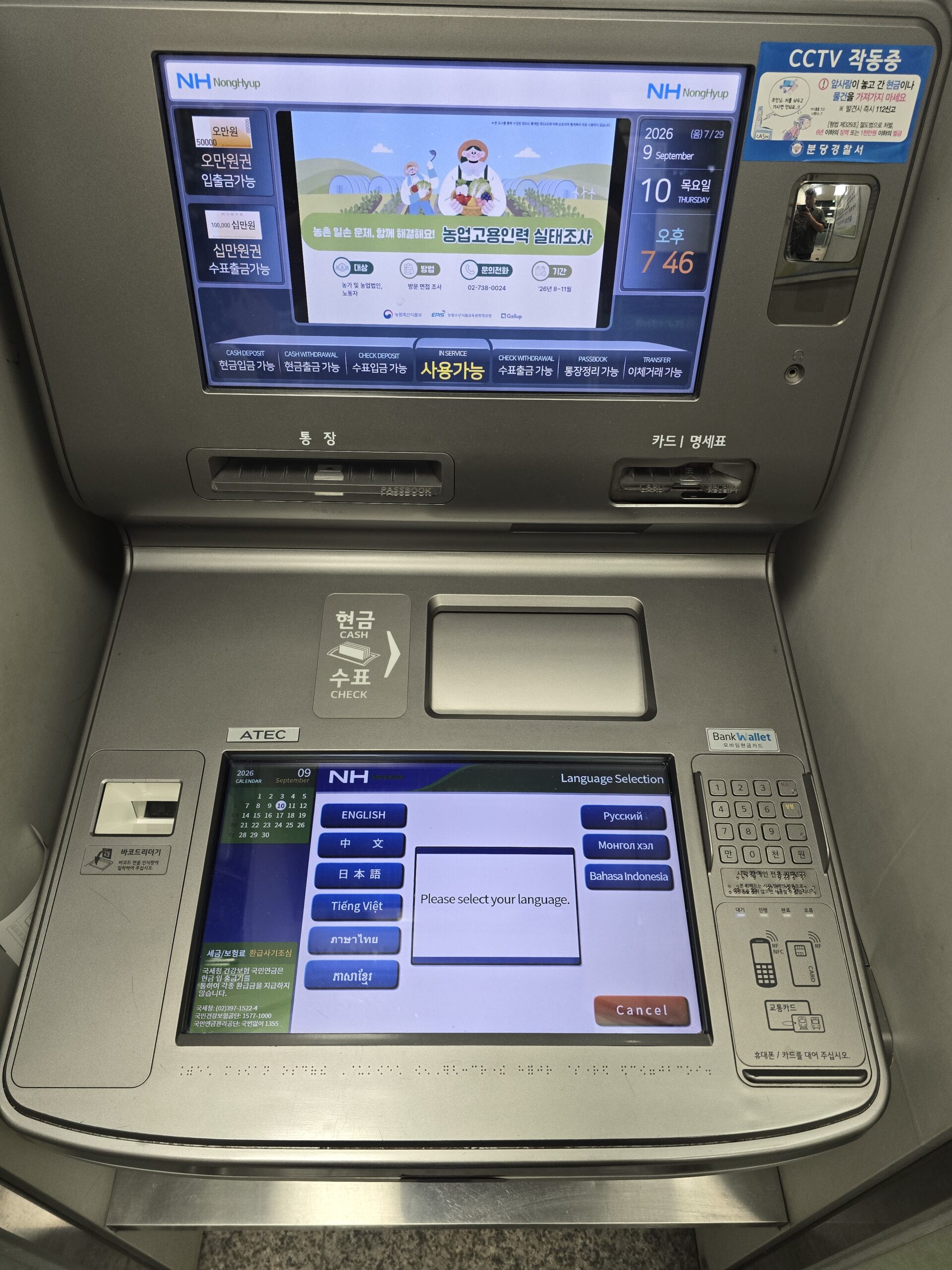
Language buttons can be on the lower touch screen rather than the large display above it. On this NongHyup machine, select ENGLISH on the lower screen, then follow the options offered by that machine. An English menu alone does not confirm that your foreign-issued card is supported.
Debit card or credit card?
A debit withdrawal normally draws from the linked deposit account, subject to issuer and ATM rules. A credit-card cash withdrawal may be treated as a cash advance, which can have a separate fee, interest treatment, and limit. The ATM’s displayed local fee is not necessarily the total cost.
If you do not know how the issuer classifies the transaction, stop and check before using a credit card for cash. A normal card purchase and an ATM cash advance can have very different terms.
Understand the possible costs
There is no reliable universal Korea ATM fee for every foreign card. The total can include:
- A local ATM operator fee shown on screen
- An issuer ATM or international-use fee
- A card-network or issuer currency-conversion spread
- A credit-card cash-advance fee and possible interest
- Dynamic Currency Conversion when offered and accepted
The machine may show only its own part. Review the issuer’s terms before travel and the account activity afterward.
Choose Korean won or home currency
If the ATM offers to convert the withdrawal into your home currency, it is offering Dynamic Currency Conversion. Visa says the offer should disclose both currencies, the exchange rate, and any additional markup, and that the cardholder can accept or decline.
Read the screen rather than following a universal button instruction from an old article. Compare the disclosed DCC terms with how your issuer normally converts KRW. If the choice is unclear, cancel safely and use another official cash source.
How much should you withdraw?
Withdraw for known cash tasks, not simply the machine maximum. A card-first traveler may only need enough for transport-card loading, a small cash purchase, and one recovery step. The cash Guide gives an editorial starting range and a task-based formula.
Several small withdrawals can multiply fixed fees. One very large withdrawal increases loss exposure. Balance the known need, fee structure, machine limit, issuer limit, and how securely you can store the cash.
If something goes wrong
Swipe or scroll to see all columns.
| Problem | Possible boundary | Safest next action |
|---|---|---|
| The machine says the card is unsupported | Network or foreign-card path does not match | Cancel, retrieve the card, and use another official Global ATM showing the correct logo |
| The issuer declines the withdrawal | International ATM use, PIN, account, funds, limit, or fraud control may be involved | Stop repeated retries, check the issuer app, then contact the issuer officially |
| The ATM offers only an unclear conversion | DCC terms are not understood | Cancel before confirming and compare at another official machine or counter |
| Cash is not dispensed but the account shows a debit or pending item | The transaction may have failed or partially processed | Keep the receipt and machine location, contact the ATM operator and issuer, and do not repeat large withdrawals blindly |
| The ATM retains the card | Machine or issuer security process intervened | Note the bank, terminal, machine, time, and official contact; notify the issuer and lock the card if advised |
| The screen or slot looks altered | Possible tampering | Do not insert the card; move to a bank-connected or staffed official machine |
| A helper asks for the PIN or phone | It is not a safe recovery method | Refuse, cancel, secure the card, and contact bank or airport staff yourself |
Airport withdrawal path
Incheon Airport’s official facility search lists 24-hour ATMs and some 24-hour exchange counters in both terminals, but locations and hours vary. Confirm your actual terminal and the current facility listing after arrival.
If the first airport ATM fails, do not assume the card is unusable everywhere. Try one other official Global machine with the matching logo or use a staffed exchange counter if you carry suitable currency. Then continue the broader arrival sequence in Your First 60 Minutes at Incheon Airport.
Protect the card and account
Cover the keypad, keep the card in sight, and decline help from strangers. Never share a PIN, security code, full card image, issuer password, one-time code, or remote screen access. Keep the receipt until the withdrawal and any fee are correctly reflected.
Split the withdrawn cash and store the backup separately from the primary wallet. If the card is lost or retained, use the issuer’s official lock and emergency process immediately.
Useful Korean phrases
해외 카드로 출금할 수 있나요?— Can I withdraw with a foreign card?글로벌 ATM이 어디에 있나요?— Where is a Global ATM?카드가 나오지 않아요.— The card is not coming out.현금이 나오지 않았어요.— The cash did not come out.영수증을 주세요.— Please give me the receipt.
Before confirming the withdrawal
- The machine is official, intact, and shows my network.
- I selected the correct account type and KRW amount.
- I read the local fee and any conversion choice.
- I know how my issuer treats this withdrawal.
- I will take the card, cash, and receipt before leaving.
Official-source review — October 5, 2026
Rechecked the published practical claims against the following current primary sources. This is an official-source review, not a completed transaction or journey.
Global/network recognition; issuer-specific PIN, fees and limits; credit cash-advance possibility; DCC terms and voluntary choice
english.visitseoul.net · www.airport.kr · www.mastercard.com · www.visa.com
No purchase, activation, account verification, withdrawal, payment, booking, ride or on-site journey was performed in this review. Existing screenshots keep their original dates and limitations. Live operator and issuer rules control; individual success remains unverified.
Official sources
| Institution | Official page | What it was used to verify |
|---|---|---|
| Seoul Tourism Organization | Money | Global ATM recognition, language support, 24-hour availability context, and possible convenience-store fees |
| Incheon International Airport Corporation | Financial facilities | Current airport banks, exchange counters, ATMs, terminal locations, and operating hours |
| Seoul Metropolitan Government | Currency Exchange | Official exchange-channel and Korean-currency context |
| Visa | Dynamic Currency Conversion | DCC disclosure, currency choice, exchange rate, and markup |
| Mastercard | Frequently Asked Questions | Issuer contact and card-security context |
Sources were checked on September 2, 2026. No ATM, card, PIN, issuer setting, withdrawal, fee, limit, cash advance, exchange rate, DCC choice, retained-card process, or dispute was independently tested.
Change log
- 2026-10-06 — Simplified repeated review text and/or added task guidance and clearly labeled calculation examples. Original evidence dates, verification status and test limits are unchanged.
- 2026-10-05 — Rechecked current primary-source practical conditions and recovery limits. No transaction or journey was field-tested.
- 2026-09-16 — Added practical photo examples and screen-reading instructions. The Guide-wide verification date and transaction-test status are unchanged.
- 2026-09-10 — Added contextual photographs and instructional screenshots with source and privacy notes. This media update does not change the information-verification date or field-test status.
- 2026-09-02 — Check Global ATM support, withdrawal fees and currency conversion before confirming; keep a recovery plan for a retained card or missing cash.
- 2026-09-02 — Verification scope: No ATM, card, PIN, issuer setting, withdrawal, fee, limit, exchange rate, cash advance, DCC choice, or dispute was independently tested.
Official-source checked Checked
The listed official sources were checked for this version of the guide.
Official-source review: October 5, 2026. No transaction or journey was tested. See the detailed review and sources below.
- Next review
- Change rate
- Reviewed every 30 days
- Sources checked
- 5