Official-source checked
The short answer
Call 112 for police and 119 for fire, rescue, or a medical emergency. Give the exact Korean location before the full story, explain what happened, state consciousness and breathing when relevant, keep the line open, and follow the operator.
1330 is not emergency dispatch and KTO currently lists telephone and real-time chat. Check current availability for non-emergency travel information and interpretation. Save 1345 for immigration questions, LOST112/182 for non-urgent lost property, and the current government Emergency Ready app for preparation without letting an app delay 112 or 119.
- Korean phone number
- Not required
- Foreign-issued card
- Not applicable
- Korean ID
- Not required
- English support
- Partial English
In this guide
Choose the correct number
Swipe or scroll to see all columns.
| Situation | First contact | Do not substitute |
|---|---|---|
| Violence, threat, stalking, theft in progress, missing vulnerable person, or other police emergency | 112 Police | A hotel desk, insurer, embassy, or 1330 cannot dispatch police |
| Fire, smoke, rescue, traffic injury, serious fall, breathing problem, unconscious person, or urgent medical emergency | 119 Fire · Rescue · Medical | A private hospital number or travel helpline is not the dispatch route |
| Non-emergency travel information, interpretation, or tourism complaint | 1330, after checking current availability | Do not call it instead of 112 or 119 when time matters |
| Visa, entry, stay status, immigration office, or immigration administration | 1345 Immigration Contact Center | It is not a police or ambulance number |
| Lost item already missing with no immediate danger or crime in progress | LOST112 / 182 | If theft is happening or safety is threatened, use 112 |
| Infectious-disease information | 1339 KDCA where current official guidance directs | A severe medical emergency still goes to 119 |
The shortest correct decision is more useful than a long directory: 112 police; 119 fire, rescue, and medical emergency. Save the other channels separately so a non-emergency question never delays dispatch.
Before departure — build an offline help card
Save one note that can be opened without mobile data. Include:
112 — Police emergency;119 — Fire, rescue, medical emergency;- your accommodation’s Korean name, full Korean road address, building, floor, front-desk number, and map pin;
- your full name, date of birth, nationality, and passport number in a secure private record—not a public screenshot;
- important conditions, allergies, medicines, and an insurer assistance number;
- one trusted contact and your embassy or consulate’s current official contact;
- the Korean names of places you plan to visit; and
- the live links for 1330, 1345, LOST112, Emergency Ready, and your insurer.
Do not put a full passport image, card number, insurance login, future itinerary, or home address on an unlocked public-facing card. A short medical and location note is useful; a complete identity file on the lock screen creates another risk.
Step 1 — make the scene safe enough to call
Move away from traffic, fire, smoke, violence, unstable structures, water, or another immediate hazard when doing so is safe. Do not enter a dangerous area to take photographs or recover luggage. If another person is present, ask one person to call while another meets responders or helps with operator-directed first aid.
For a crime or threat, preserve distance and do not confront the person for evidence. For a fire or medical emergency, follow the 119 operator rather than improvising from an online article.
Step 2 — give the location before the story
Responders need a destination. Start with the most precise location you have:
- full Korean road address;
- building, hotel, station, attraction, or shop name;
- floor, room, platform, exit, gate, or entrance;
- nearby major landmark; and
- a map pin or coordinates when asked.
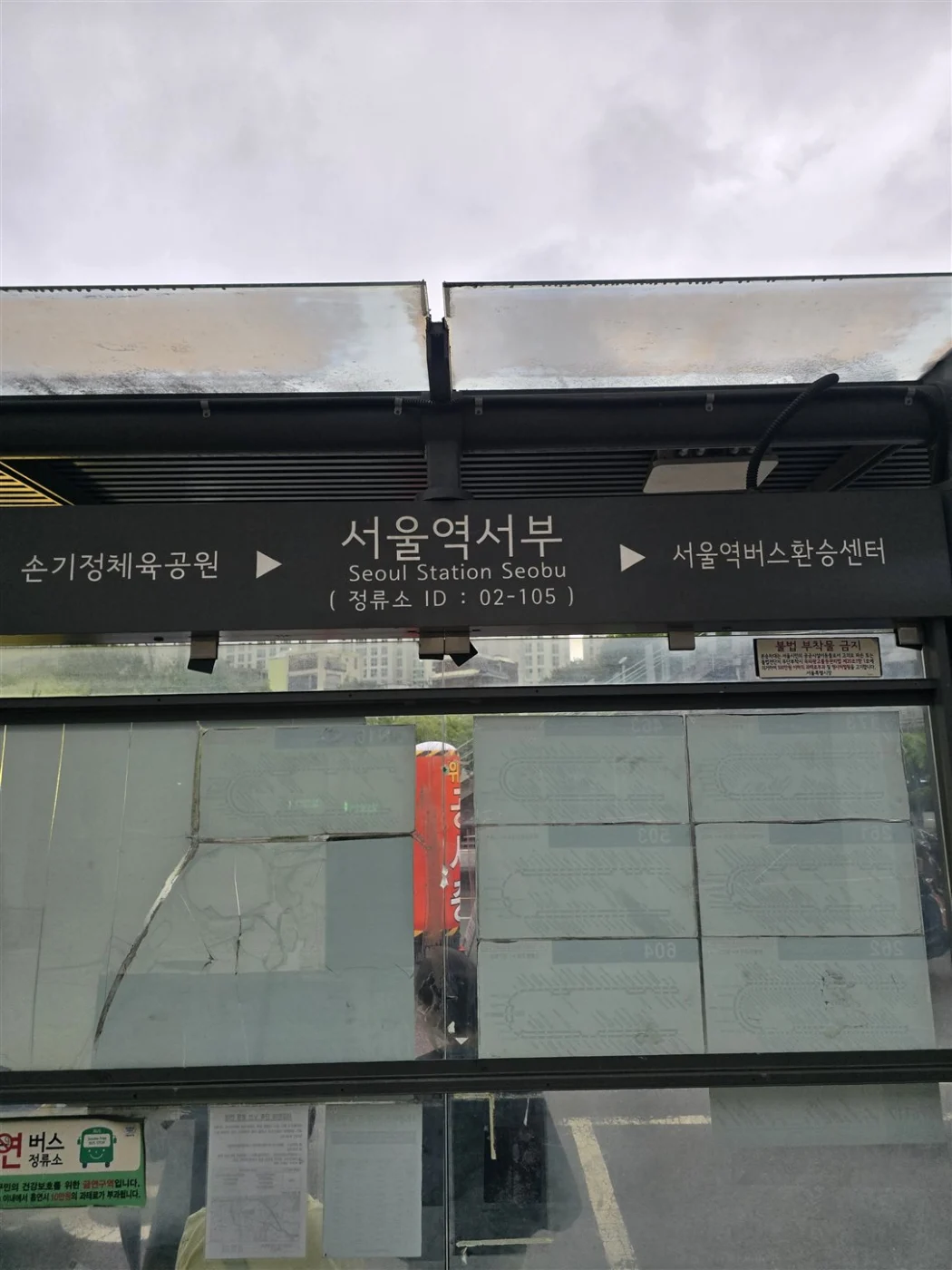
The National Fire Agency says that if the address is unknown, callers can use a nearby large building and phone number, elevator identification number, national point number, utility-pole number, or highway marker, and should keep smartphone GPS on. Do not guess an address. Read the Korean text from NAVER Map, a hotel card, receipt, station sign, or staffed desk.
Useful Korean:
위치부터 말씀드릴게요. — I will give you the location first. 주소는 [주소]입니다. — The address is [address]. [건물] [층/출구]에 있어요. — I am at [building], [floor/exit].
Step 3 — state the emergency in one sentence
Use plain facts:
I need police. A person is threatening us. We are at [location]. I need an ambulance. One adult is unconscious but breathing. We are at [location]. There is smoke on the [floor] floor. We are outside at [entrance].
Then answer questions. Give the number of people, approximate age, consciousness, breathing, bleeding, fire/smoke, weapons or continuing danger, and any major condition or medicine you actually know. Do not diagnose or exaggerate. If you do not know, say so.
Useful Korean:
경찰이 필요해요. — I need the police. 구급차가 필요해요. — I need an ambulance. 불이 났어요. — There is a fire. 의식이 없어요. — The person is unconscious. 숨을 쉬고 있어요 / 숨을 안 쉬어요. — The person is breathing / is not breathing. 영어 통역이 필요해요. — I need English interpretation.
Step 4 — keep the line open
Do not hang up just because the location was given. The operator may need to verify the entrance, update responders, assess breathing, or give immediate instructions. Put the phone on speaker only if it helps you follow directions safely.
The National Fire Agency tells callers to keep the line open, receive medical guidance, and perform instructed first aid while waiting. This article does not replace those instructions.
Step 5 — prepare for the responders
When safe:
- unlock or identify the correct entrance;
- send someone to a visible meeting point;
- secure pets and clear obstacles;
- gather the patient’s ID or passport, medication list, essential medicines, and insurance information;
- note what happened, when symptoms began, changes since the call, and first aid already given; and
- do not leave the patient alone unless required for safety.
The National Fire Agency recommends telling the crew how the condition changed, what first aid was provided, and known diseases, hospital information, and medicines.
If you cannot communicate in Korean
Say “영어 통역이 필요해요” and keep sentences short. Use the exact address on screen rather than translating it. A nearby hotel desk, station employee, shop worker, or bilingual bystander can help communicate a location, but hand the phone over only with consent and keep control of your unlocked device and personal information.
If the situation is not an emergency, the official 1330 page lists telephone and real-time chat for tourist information, interpretation, and complaints. The previous maintenance-notice URL could not be retrieved during this update. Do not treat that old notice as proof of a current outage; check the live service page. We did not test a call or chat connection. Never wait for 1330 when 112 or 119 is needed.
Emergency Ready app — preparation, not dispatch proof
The Ministry of the Interior and Safety’s current replacement Emergency Ready Android listing shows an update on September 8, 2026. It says the app can locate shelters, emergency medical centers, fire stations, and police stations; provide CPR, burn, fire-extinguisher, and hydrant guides; and offer a direct 119-call action. The current Google Play listing identifies the ministry as a government developer and declares no collected or shared data, but store declarations and app behavior can change.
Use the current package kr.or.klid.newengsafekorea2025, not a legacy listing. Install it before travel, verify the developer, download any information you need, and test that your phone can place a normal call. Do not navigate an app while immediate danger requires 112 or 119.
Medical help without an immediate emergency
For a severe or rapidly worsening condition, call 119. For a stable, non-life-threatening problem, use a current official medical-information source, your insurer, accommodation staff, or a hospital’s verified international center. Confirm the facility, hours, language, payment, and whether an appointment is required before traveling there.
Do not assume every clinic has an English-speaking clinician, accepts every foreign insurance arrangement, or is open because an old blog lists it. If symptoms become severe during the search, switch to 119.
Police, theft, and lost property are different paths
For the search and collection steps, use our lost-property guide: find a matching record, confirm its keeper and arrange pickup.
For immediate danger or a crime in progress, call 112. For a non-urgent lost item, use the National Police Agency’s Police Civil Service 24 (경찰민원24) portal, now the official route for LOST112 services. Under 유실물 민원, choose 습득물 검색 to search found items or 분실물 신고 for loss reporting. Online reporting can involve login or identity checks; if you cannot complete them, the official loss-report guide also lists an in-person route. The portal lists 182 for paid non-emergency enquiries, weekdays 09:00–18:00 KST. This route was rechecked on October 29, 2026; an online report was not submitted.
Freeze cards and payment accounts separately when a wallet or phone is missing. Do not publish serial numbers, identity documents, device unlock details, or full card information in public lost-property posts.
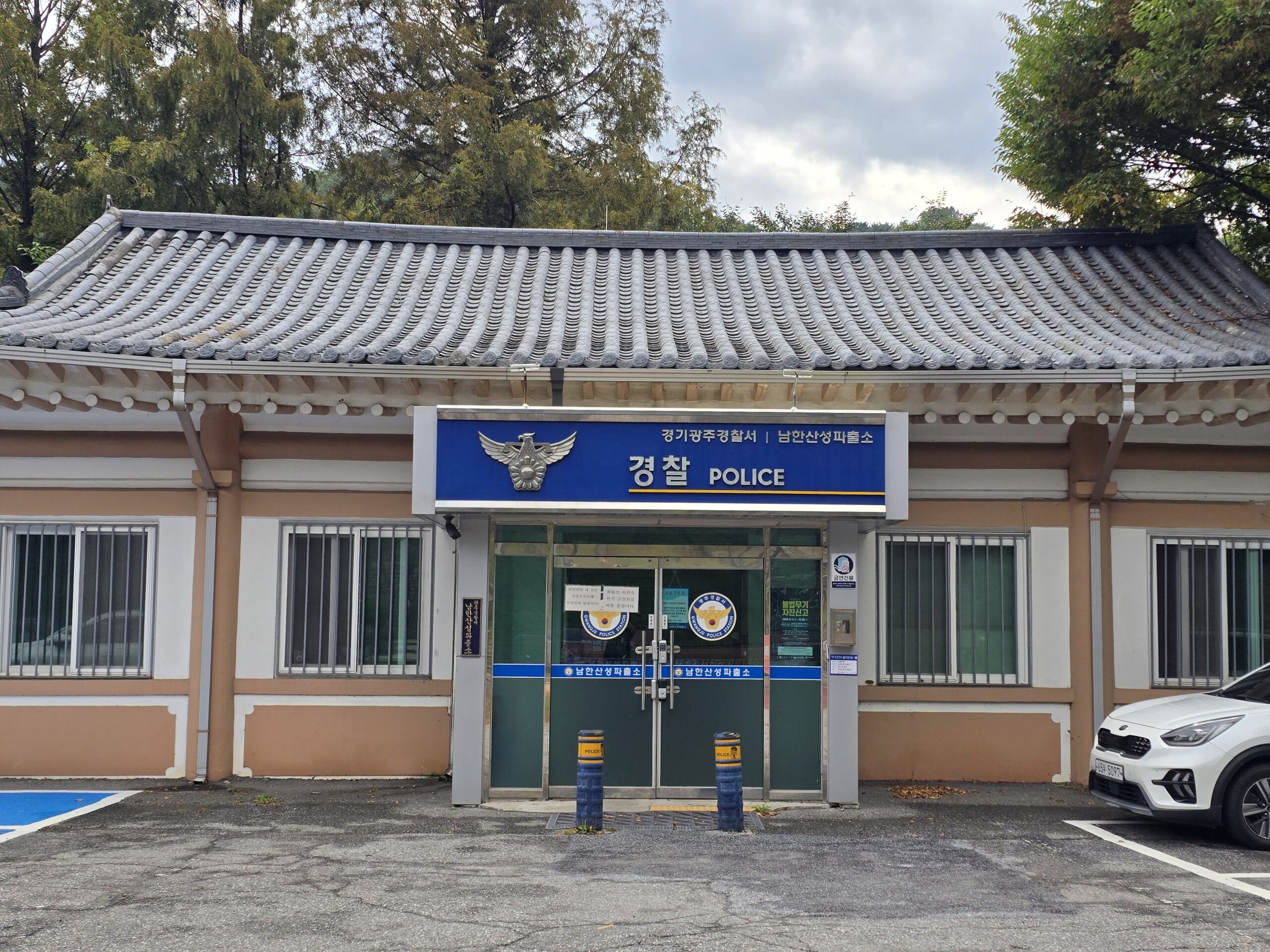
For in-person police assistance, look for 경찰 / POLICE signage. The photo shows Namhansanseong Police Substation (남한산성파출소) in Gwangju, Gyeonggi-do. The sign helps identify the building; it does not confirm opening hours or English-speaking staff. In an immediate emergency, call 112 instead of spending time looking for this location.
Start with the last journey when a phone is missing
Write down when and where you last had the phone. For a taxi, keep the trip record or receipt and any vehicle details; for a bus or train, note the route, direction, boarding and exit stops, time and car number if known. Contact the relevant operator through its official channel. A newly found item may not yet appear in a central search.
If your device’s official location service was already enabled, use another trusted device to check it and follow the manufacturer’s lost-device instructions. Apple expanded Find My in South Korea from April 1, 2025; older claims that it is entirely unavailable are outdated. Device, software and setup conditions still apply. A location pin is a clue, not proof of who has the phone; do not confront someone or enter private property.
If the phone also holds payment or account access, contact your issuer and mobile provider through their official channels. See the taxi guide’s receipt and trip-record steps for the transport details to preserve.
Immigration and embassy support
Use 1345 for immigration, stay status, office jurisdiction, and related administrative information—not for dispatch. The Korea Immigration Service currently lists weekday counseling from 09:00 to 22:00; after 18:00, only Korean, English, and Chinese are listed. Its official page also provides international contact routes. Re-check hours before calling.
An embassy or consulate can provide country-specific consular guidance, but it does not replace Korean police, fire, rescue, or ambulance dispatch. Obtain the current contact only from your government’s official site.
Common failure points
Swipe or scroll to see all columns.
| Failure | Why it matters | Recovery |
|---|---|---|
| Calling 1330 for an active emergency | It is not the emergency-dispatch number; a listed contact route does not guarantee an immediate response | Call 112 or 119 immediately |
| Giving a long story before the location | Dispatch cannot reach an unknown place | Give Korean address, building, floor/exit, and landmark first |
| Relying on mobile data only | Signal, battery, roaming, or app access can fail | Keep an offline address and number card; use another phone or staffed place |
| Guessing the English place name | Similar names and branches can misdirect help | Read the Korean address or share the exact map pin |
| Hanging up too early | The operator may need updates or give first-aid instructions | Keep the line open until told otherwise |
| Treating an old app listing as current | The Emergency Ready package changed in 2026 | Verify the current ministry developer and package before installation |
| Posting evidence publicly | Faces, plates, medical details, room numbers, and itinerary can expose people | Preserve evidence privately and give it directly to police, insurer, or relevant authority |
| Assuming embassy or insurer dispatches Korean responders | They support their own scope, not Korea’s emergency response | Use 112/119 first, then notify other contacts when safe |
Compatibility details and limits
Swipe or scroll to see all columns.
| Check | Status |
|---|---|
| Korean phone number | Not required as an identity condition, but a working voice connection or another reachable phone is needed to call |
| Korean ID | Not required to request immediate emergency help; responders or hospitals may later need identity and medical information |
| Foreign-issued card | Not applicable to dispatch; downstream hospital, transport, pharmacy, or insurer payment is separate |
| English support | Varies by operator, service, time, and transfer; ask clearly for English interpretation |
| Field-tested by Korea Untangled | No — official-source checked only |
FAQ
Is 119 only for fire?
No. Current official visitor guidance assigns 119 to fire, rescue, and medical emergencies, including ambulance response.
Should I call 1330 before 112 or 119 because I need English?
No. Call the correct emergency number first and ask for English interpretation. 1330 is non-emergency travel support; its current public page lists phone and chat, which we have not connection-tested.
Can I text or use an app instead of calling?
Do not assume a text or app route will work on your device or current service configuration. The checked Emergency Ready app offers a 119 call shortcut, but the safest default in an immediate emergency is a voice call to 112 or 119 from any available phone.
Does a 119 ambulance guarantee a particular hospital or no bill?
No. Dispatch, destination, hospital acceptance, treatment, and costs are separate matters. Follow responders and use your insurer or hospital for payment questions after immediate safety is handled.
What if my phone has no Korean SIM?
Try the emergency number on your available voice connection. If the call cannot be placed, use another phone or immediately ask a staffed accommodation, station, shop, or bystander to call while you provide the exact location. Do not delay to buy a SIM.
What should I show a hotel employee or bystander?
Show the correct number and exact Korean location, then one sentence describing the problem. Avoid handing over unrelated passport, payment, or account data.
Official sources
| Source | Use |
|---|---|
| KTO Emergency Situations | 112 police, 119 fire and medical emergency, 1339, 1330, LOST112 and 182 visitor summary |
| KTO 1330 Travel Helpline & Complaint Center | Current public description of travel information, interpretation, complaints, online call and chat |
| KTO Helpful Apps & Resources, updated June 2026 | Current Emergency Ready replacement listing and multilingual feature summary |
| Emergency Ready on Google Play | Current Android package, government developer, September 8, 2026 update, features and declared data safety |
| National Fire Agency: how to report a 119 medical emergency | Location, patient details, callback and operator-guided first-aid sequence |
| National Fire Agency: prepare before the ambulance arrives | Meeting responders, essential items and information for the crew |
| Korean National Police Agency service charter | Dialing 112 without an area code for a crime report |
| Korea Immigration Service 1345 | Current counseling scope, hours, languages and overseas contact information |
| National Police Agency LOST112 | Found-property search, online loss-report boundary and 182 guidance |
Change log
- 2026-10-29 — Rechecked 112 police, 119 fire/rescue/medical emergencies, the live 1330 phone/chat information, 1345 weekday hours and Police Civil Service 24 lost-property guidance. The current Emergency Ready listing remains the ministry’s replacement app. No emergency call, chat connection, dispatch or report was tested. Official documents were reviewed. No purchase, payment, booking, journey, app onboarding or physical-device test was performed.
- 2026-09-17 — Rechecked KTO emergency/1330 guidance, the browser-rendered National Fire Agency reporting and arrival-preparation instructions, police/LOST112 and 1345 information, current Emergency Ready disclosures, and Apple Find My announcement. Kept 112/119 first and clarified that public contact listings do not prove connectivity. No emergency call, dispatch, interpretation, app, hospital, report or field response was tested.
- 2026-09-17 — Checked the current 1330 public service page and Emergency Ready Android listing. Removed the implication that an inaccessible old maintenance notice proves an ongoing outage; updated the store date. No live call, chat, dispatch or app test. This partial check does not renew the whole-guide review date.
- 2026-09-16 — Added focused recovery steps and clarified traveler conditions; corrected the Galaxy image description and the police lost-property route where applicable. Sources for the amendments were checked today. The Guide-wide verification date and field-test status are unchanged.
- 2026-09-16 — Added practical photo examples and screen-reading instructions. The Guide-wide verification date and transaction-test status are unchanged.
- 2026-09-10 — Aligned the quick answer and added a dated, scoped official-source check. The full-guide verification date and field-test status are unchanged.
- 2026-09-10 — Added contextual photographs and instructional screenshots with source and privacy notes. This media update does not change the information-verification date or field-test status.
- 2026-09-01 — Removed the generic AI illustrations and shortened the verification note. Emergency numbers, official-source status, and the 2026-08-13 verification date did not change.
- 2026-08-13 — Initial official-source draft created. Verified 112 police and 119 fire, rescue and medical roles, 119 reporting guidance, current Emergency Ready replacement package, 1345 scope and hours, LOST112/182 boundary, and the 1330 non-emergency role plus unresolved maintenance notice. Added offline preparation, location-first call scripts, interpretation and no-phone fallbacks, privacy controls and three clearly disclosed AI-generated editorial illustrations. No live service or field response was independently tested.
- 2026-10-30 — Added the same-language lost-property retrieval guide; existing verification date and scope preserved.
Official-source checked Checked
The listed official sources were checked for this version of the guide.
Official-source review · 2026-10-29
Rechecked 112 police, 119 fire/rescue/medical emergencies, the live 1330 phone/chat information, 1345 weekday hours and Police Civil Service 24 lost-property guidance. The current Emergency Ready listing remains the ministry’s replacement app. No emergency call, chat connection, dispatch or report was tested.
english.visitkorea.or.kr · english.visitkorea.or.kr · www.immigration.go.kr · play.google.com · minwon24.police.go.kr
Official documents were reviewed. No purchase, payment, booking, journey, app onboarding or physical-device test was performed.
- Next review
- Change rate
- Reviewed every 30 days
- Sources checked
- 12