Start with the practical guide
This page describes the service and its limits. For the travel task, use the linked step-by-step guide. Open the travel guide.
What Papago is for
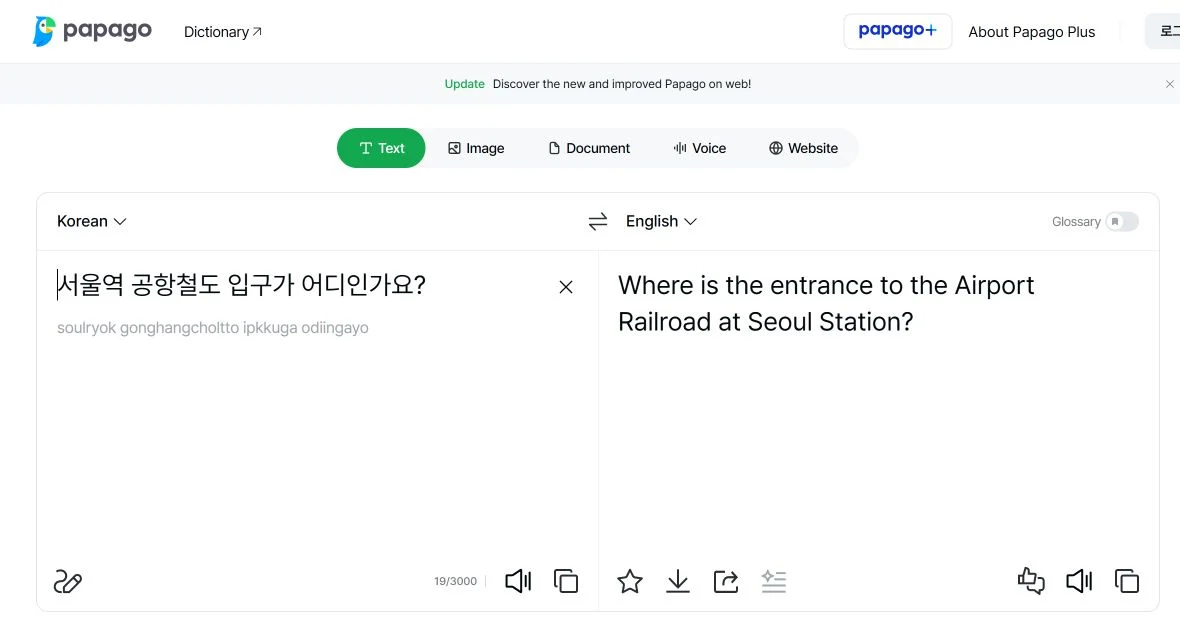
Papago is NAVER’s translation service for text, images, voice, conversations, websites, and documents. For a visitor to Korea, the narrowest dependable starting point is the official web text translator: it opens while signed out and does not require a Korean phone number, Korean account, Korean ID, passport, or payment.
Use Papago to understand a short sign, menu item, place name, or routine message, then verify any important meaning another way. Machine translation is an aid, not an authority for emergencies, medical treatment, allergies, legal duties, immigration, contracts, transfers, or safety-critical instructions.
Compatibility summary
NAVER’s current web help says a signed-out user can translate up to 3,000 characters at a time and should log in for longer text. That confirms a basic no-Korean-phone and no-Korean-account route. It does not prove that saved items, glossary, documents, Papago Plus, account recovery, or every app feature stays available without login.
The current app listings document 14 core translation languages: Korean, English, Japanese, Simplified and Traditional Chinese, Spanish, French, Vietnamese, Thai, Indonesian, Russian, German, Italian, and Arabic. The web text-help page additionally offers Hindi and Portuguese only when paired with English. Feature-specific language support can be narrower.
Start with the signed-out web route
Open papago.naver.com, confirm the source and target languages, and translate only a short, non-sensitive passage. If the result changes a booking, fare, address, deadline, dosage, allergy, or safety decision, compare the original text with an official English page or ask a qualified human to confirm it.
For place names, keep the exact Korean name and road address beside the translation. Search the Korean text in NAVER Map or KakaoMap and verify the branch and map pin. A fluent-looking English translation can still point to the wrong station exit, restaurant branch, building entrance, or neighborhood.
Prepare the app and offline fallback
Install only the app published by NAVER Corp. The checked listings currently require iOS 17.0 or later or Android 9.0 or later. Camera, microphone, speech-recognition, photos, storage, location, and notifications can be requested for particular features. Grant only the permissions needed for the task and recheck them after an update.
NAVER’s current Korean offline help documents downloaded text and voice translation among Korean, English, Japanese and Simplified Chinese. Text translation requires at least 4 GB RAM; Android voice translation also requires Android 14 or later and an additional voice language pack. iOS text and voice translation require at least 4 GB RAM. The iPhone release history added offline voice translation on September 1, 2026. A separate English network-help page still says translation needs a connection, so test the exact supported language pair and feature on your device before departure. Traditional Chinese is not listed among the offline languages. Keep saved phrases as a fallback.
Translate without exposing sensitive data
Crop an image to the minimum necessary text and exclude faces, passport numbers, booking codes, payment details, health records, private messages, and unrelated surroundings. For voice translation, move to a quiet place, say one short idea at a time, and confirm names, numbers, dates, times, prices, and negative words separately.
The iPhone listing says OS speech recognition can send voice data to Apple for selected languages. Privacy handling can differ by feature, device, account, and release. Read the current permission and privacy screens before translating confidential material; when possible, replace sensitive details with neutral placeholders.
For a medical or safety situation, do not rely on a translated sentence alone. Keep the emergency and travel-help contacts available so you can ask for the appropriate human assistance.
When to use a human or official source
Stop troubleshooting Papago when the consequence of a wrong translation is high. For an emergency, call 112 or 119 and use the available interpreter route. For medical, legal, immigration, financial, or contractual questions, use the responsible institution’s official multilingual material or a qualified interpreter.
Keep a small offline card with your accommodation address, essential Korean place names, allergies or access needs written by a reliable source, emergency numbers, and one request for human help. Papago is most useful when it is one layer in that plan—not the only way to understand, navigate, or ask for help.
Official-source review · 2026-10-29
Rechecked the 3,000-character signed-out web limit and current offline requirements. Downloaded text/voice translation supports Korean, English, Japanese and Simplified Chinese; Traditional Chinese is not listed offline. Offline voice on Android requires Android 14+, 4 GB RAM and the additional voice pack. The older generic English network-help page remains inconsistent.
help.naver.com · help.naver.com · help.naver.com · apps.apple.com · play.google.com
Official documents were reviewed. No purchase, payment, booking, journey, app onboarding or physical-device test was performed.