Home/Services/WOWPASS

WOWPASS

Tourist prepaid merchant-payment card with a separate Tmoney balance. Funding the payment balance does not automatically fund transit.

Official-source checked onlyThe documented route was not independently field-tested.
Korean phone
Not required
Foreign card
Partially supported
Languages
Korean, English, Japanese
Payments & BookingNationwide
Official-source checked Checked Official sources: 9
Trust and freshness

The listed official sources were checked; no independent field test is claimed.

Next review
Relationship disclosure

This page links to official WOWPASS and Orange Square resources as non-affiliate editorial references. No direct sponsorship or commercial agreement with WOWPASS or Orange Square is recorded. Separately, selected Korea Untangled guides contain disclosed KKday affiliate links for WOWPASS; qualifying bookings through those links may earn us a commission. This service page does not contain a KKday affiliate booking CTA.

Traveler compatibility

These values describe the checked route, not every possible account, device, merchant, or future version.

CheckCurrent documented status
Foreign phone numberUnknown
Korean accountNot required
Korean IDNot required
PassportRequired
PlatformsAndroid, iOS
Web versionAvailable
Payment methodsSupported international credit cards and mobile wallets for eligible WOWPASS payment-balance top-up routes, subject to live country, network, authentication, amount, and fee conditions, Supported foreign-currency cash at WOWPASS machines; the current guide lists 16 currencies and specific banknote denominations, Korean-won cash at supported WOWPASS and Tmoney top-up routes
Operating hoursThe website and apps are generally available while their required services are operating. Card issuance, airport pickup, WOWPASS machines, cash withdrawal, Tmoney top-up, customer support, and participating merchants have separate location-specific hours and availability.
RegionNationwide

Start with the practical guide

This page describes the service and its limits. For the travel task, use the linked step-by-step guide. Open the travel guide.

What WOWPASS is for

WOWPASS is a physical prepaid payment card for foreign travelers in Korea. It combines a Korean merchant-payment balance, currency-loading routes, app-based balance and security tools, and a Tmoney transportation function on the same physical card.

The physical card does not merge those jobs into one balance. At eligible offline merchants, insert the IC chip and spend from the WOWPASS payment balance. On eligible public transport, tap the card and spend from the separately funded Tmoney balance. Treat them as two wallets that happen to share one card.

Compatibility summary

The checked kiosk issuance route requires a non-Korean passport and agreement to WOWPASS membership terms. It does not document a Korean phone number, Korean bank card, Korean account, or Korean ID as a prerequisite. Korea Untangled did not independently test app registration or a particular country code, so foreign-phone support remains unknown.

International credit cards and mobile wallets are partially supported for eligible WOWPASS payment-balance top-ups. The current official site lists international-card, wallet, Korean-won cash, and supported foreign-currency cash routes. Country, network, issuer, authentication, amount, exchange rate, fee, app, and machine conditions still apply.

Issue and register the card

The Orange Square FAQ describes kiosk issuance as visiting a WOW Exchange machine, selecting a new card, choosing a currency, verifying a non-Korean passport, agreeing to membership terms, inserting supported cash, receiving the card, and inserting it once to activate it. The current product page lists a KRW 6,000 machine price and a KRW 5,500 pre-booked price, but promotions and packages can change.

Do not confuse an airport pickup counter with an airport WOW Exchange kiosk. The current product page advertises a WOWPASS, Tmoney, and SIM package through an airport SKT Roaming Center, while the FAQ says Incheon Airport currently has no WOW Exchange kiosk. Use the exact reservation confirmation, terminal, counter, opening time, and pickup route rather than expecting walk-up kiosk issuance.

Register the card in the official app promptly if balance monitoring, payment alerts, pause, cash withdrawal verification, or reissue matters. Review the current App Store, Google Play, and privacy disclosures before adding passport, contact, financial, location, or identifier data.
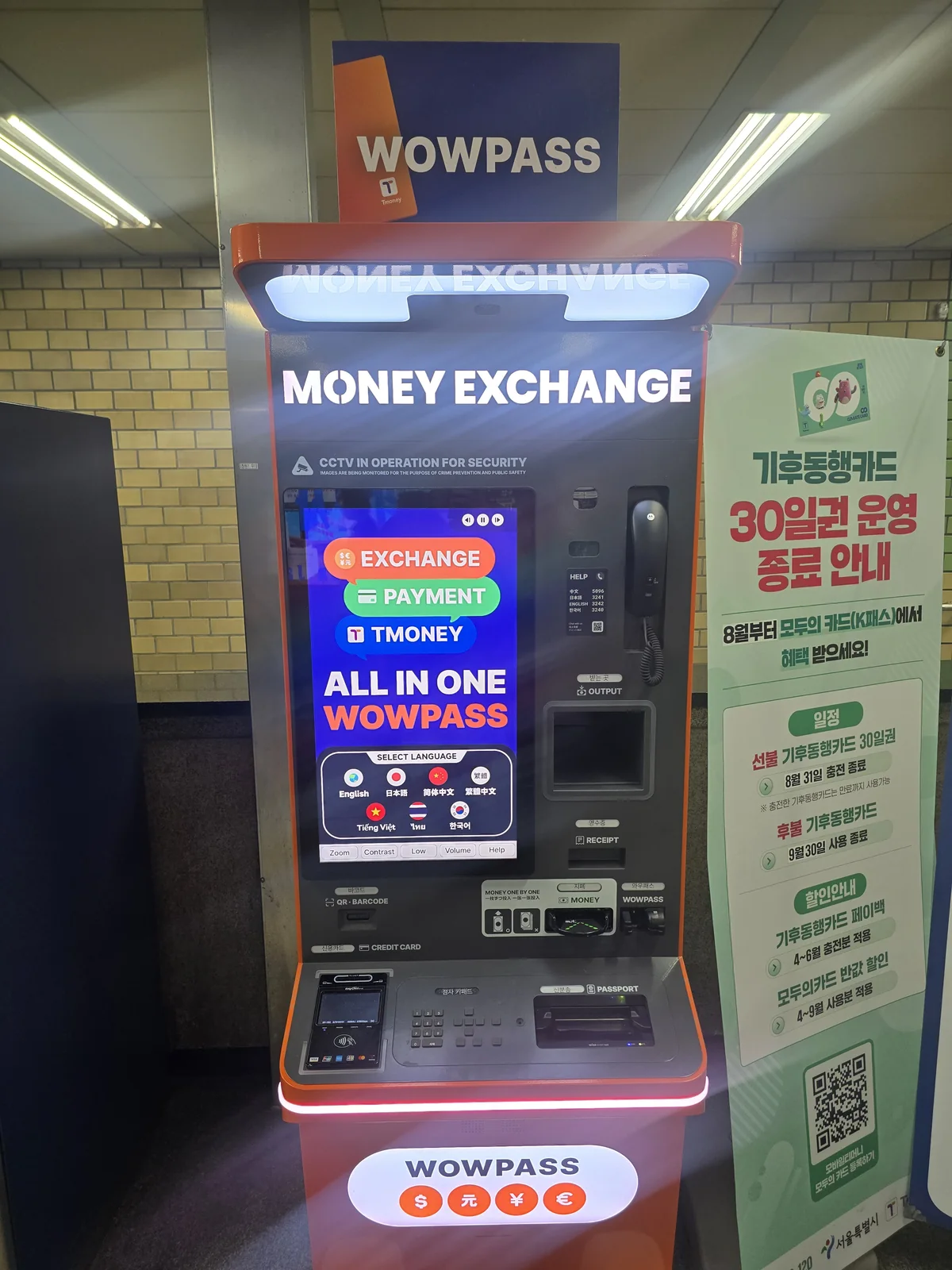
WOWPASS exchange kiosk showing English and other language choices.
Recognize the kiosk and choose your language before starting. The WOWPASS payment balance and Tmoney transport balance are separate. Photo: Korea Untangled, September 3, 2026; no transaction was tested.

Keep the balances separate

WOWPASS payment top-up and Tmoney transport top-up are different actions. The official How to Use page says the payment balance can be topped up at machines with supported cash or cards and in the app with supported international cards or wallets. It lists 16 machine cash currencies with specific accepted banknote denominations.

The current WOWPASS How to Use page documents transferring WOWPASS payment balance into Tmoney with the app’s NFC top-up feature. This is a separate action: the balances do not combine automatically. The older Orange Square FAQ still describes cash-only loading. Check that the current app, phone and card support NFC top-up, confirm the resulting Tmoney balance, and keep Korean-won cash for a supported convenience store or station machine if it fails. This review did not test a phone or transaction.

Check both balances before the first merchant purchase and first ride. A full WOWPASS balance does not prevent a transport insufficient-balance message, and a funded Tmoney balance does not pay an ordinary merchant transaction.

Pay, withdraw, and protect the card

The operator says the WOWPASS payment balance works at offline Korean merchants that accept local credit or debit card payment, using the inserted IC chip. This does not guarantee every online checkout, deposit, recurring transaction, merchant category, terminal, or individual purchase. Keep a second bank card and cash.

The current How to Use page documents Korean-won cash withdrawal from WOWPASS machines up to KRW 100,000 per transaction, with a KRW 1,000 fee and app PIN verification. Check the live balance, machine cash availability, identity requirement, and total fees before depending on withdrawal near departure.

If a registered card is lost, pause it in the app and follow the official reissue route for the WOWPASS payment balance. The current How to Use page explicitly says the separate Tmoney balance cannot be recovered after loss, even when WOWPASS is reissued.

If an overseas card is rejected while funding the payment balance, check for an existing charge before retrying and use the foreign-card decline checklist. Do not confuse a funding failure with the separate Tmoney balance.

When not to rely on it

Do not rely on WOWPASS alone when the exact pickup route is unconfirmed, passport verification fails, the app rejects the phone or card, a foreign-card top-up fails, a merchant rejects prepaid cards, Tmoney has insufficient balance, the phone or app cannot complete the supported NFC top-up, the withdrawal machine is unavailable, or a lost card was never registered.

Use standard Tmoney when simple cash-funded transit is the only problem. Consider Climate Card only when repeated journeys fit its current eligible Seoul network. Keep an independent foreign bank card, Korean-won cash, and a separate first-ride plan. Current operator screens, fees, merchant rules, transport rules, and support instructions take priority over this record.

Official-source review · 2026-10-29

Rechecked issuance prices, separate payment/transit balances, NFC Tmoney top-up, cash withdrawal and loss protection. The current How to Use page documents converting WOWPASS balance to Tmoney in the app; the older FAQ still describes cash loading. Use the current app’s supported NFC route and retain cash as a fallback.

www.wowpass.io · www.wowpass.io · www.orangesquare.kr · play.google.com · www.orangesquare.kr

Official documents were reviewed. No purchase, payment, booking, journey, app onboarding or physical-device test was performed.

Limits and safer fallbacks
  • WOWPASS is currently documented for foreign nationals. The checked kiosk issuance route requires verification of a non-Korean passport and agreement to WOWPASS membership terms.
  • The WOWPASS merchant-payment balance and the integrated Tmoney transportation balance are separate. Loading or withdrawing the WOWPASS balance does not automatically load, refund, pause, replace, or protect the Tmoney balance.
  • The current WOWPASS How to Use page documents transferring WOWPASS payment balance into Tmoney with the app’s NFC top-up feature. This is a separate action: the balances do not combine automatically. The older Orange Square FAQ still describes cash-only loading. Check that the current app, phone and card support NFC top-up, confirm the resulting Tmoney balance, and keep Korean-won cash for a supported convenience store or station machine if it fails. This review did not test a phone or transaction.
  • International-card and mobile-wallet support varies by country, card network, issuer, authentication route, amount, service fee, and live app or machine availability. A successful WOWPASS balance top-up does not prove that a foreign card will work at every later transaction.
  • The operator says the WOWPASS balance can be used at offline Korean merchants that accept local credit or debit card payment by inserting the IC chip, but prepaid-card restrictions, merchant categories, terminals, online payments, deposits, recurring payments, and individual transactions can still be rejected.
  • The current product page offers an airport SKT Roaming Center package or pickup route, while the Orange Square FAQ says no WOW Exchange kiosk is available at Incheon Airport. Do not arrive expecting walk-up kiosk issuance; verify the exact reservation, terminal, counter, opening hours, and pickup instructions.
  • The current How to Use page documents WOWPASS-balance cash withdrawal at a WOWPASS machine up to KRW 100,000 per transaction with a KRW 1,000 fee and app PIN verification. Machine cash, balance, account, identity, and service availability can block withdrawal.
  • If a registered card is lost, pause it in the app and follow the official reissue route for the WOWPASS payment balance. The current How to Use page explicitly says the separate Tmoney balance cannot be recovered after loss, even when WOWPASS is reissued.
  • Korea Untangled did not independently issue, pre-book, pick up, register, passport-verify, fund, exchange, pay, tap, transfer, withdraw, refund, pause, replace, or field-test WOWPASS for this Service record.

Related Guides

Keep untangling your Korea trip

Compare WOWPASS with standard T-money and Climate Card before buying, then use the foreign-card Guide to prepare an independent payment fallback. Keep the WOWPASS payment balance and Tmoney transport balance separate from the first top-up onward.

Official sources checked

Checked October 29, 2026. Open the current source again before relying on time-sensitive details.

Change log
  • 2026-10-29 — Rechecked issuance prices, separate payment/transit balances, NFC Tmoney top-up, cash withdrawal and loss protection. The current How to Use page documents converting WOWPASS balance to Tmoney in the app; the older FAQ still describes cash loading. Use the current app’s supported NFC route and retain cash as a fallback. Official documents were reviewed. No purchase, payment, booking, journey, app onboarding or physical-device test was performed.
  • 2026-10-06 — Simplified repeated review text and/or added task guidance and clearly labeled calculation examples. Original evidence dates, verification status and test limits are unchanged.
  • 2026-09-17 — Added contextual links to the next relevant help guide; Added a task-specific image with localized description and evidence limits.
  • 2026-09-17 — Rechecked browser-rendered pricing, guide, issuance/airport/Tmoney FAQ, terms, current August 14 privacy policy, app disclosures and KTO. The mobile Tmoney conflict remains; clarified the explicit lost-Tmoney exclusion and updated the privacy link. No issuance, identity, app, card, payment, ride or refund test.
  • 2026-08-13 — Initial independent Service record drafted from the current WOWPASS product, purchase, and How to Use pages, Orange Square FAQ, service and privacy terms, official app-store listings, and the current KTO transportation-card page. Recorded the current official-page conflict on mobile Tmoney top-up and separated the WOWPASS payment balance from Tmoney. Marked official-source checked only; no issuance, passport, phone, account, card, wallet, cash, exchange, payment, transit, withdrawal, refund, loss, or reissue flow was independently tested.